We have just rolled out a rtBiz Helpdesk update. Over the past month, we have taken some customer feedback and have added some useful and helpful features to rtBiz Helpdesk. Additionally we have even enhanced some of current features for a better user experience.
Select Assignee and Product for every Mailbox
The Helpdesk admin can now select an assignee and product for tickets created from mailbox emails. This means, now you can add multiple mailboxes for your different products with dedicated assignee for each of them.

Outgoing Mailbox Selection
This is an enhancement that will be really helpful when you have multiple mailboxes configured and want to have same mailbox to send emails from which incoming mails are coming from. Previously, all outgoing mails had pre-defined global e-mail address.
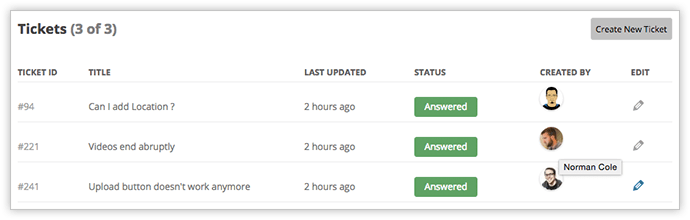
Customer Name on the Ticket Listing
Now in the ticket listing, your staff can also see the customer who has created the ticket. This will make it easy if staff wants to find ticket of any customer.
Other Updates
Some updates under and just above the hood to improve performances. Plus some really subtle UX updates to the ticket interface.
Have Suggestions?
Reach out this link and submit the features you would like us to implement https://e71a1d5d-e22b-4c34-a1b4-1f6cae4bcd26.atarimworker.io/idea/.
Links: rtBiz Helpdesk | Buy Helpdesk
Select Assignee and Product for every Mailbox
Outgoing Mailbox Selection
Customer Name on the Ticket Listing
Other Updates
Have Suggestions?
On this page
WordPress, rtbiz, helpdesk, News & Events
Credits

Vivek Jain
Author
Vivek Jain
Author
Vivek Jain has been building rtCamp since before most WordPress agencies knew what enterprise meant. He is the Co-founder and Chief Business Officer at rtCamp, where he oversees business develop…
Related articles
-
Introducing Email Only Support with rtBiz Helpdesk
News
-
Introducing the Helpdesk inside WordPress
News
Comments
Leave a Reply Cancel reply
Name*
Email*
Comment*
Submit
Δ