If you’re comparing AEM vs WordPress, there’s probably a reason behind this. Maybe your AEM renewal is coming up. Maybe your marketing team wants to publish without waiting on developers. Or maybe you’re simply reviewing your options before signing another multi-year contract.
Cost usually becomes a big part of that conversation. Enterprise AEM licensing typically runs from $80,000 to $300,000 a year. In the AEM estates we assess, teams often use only 30–40% of the capabilities they license. If that sounds like you, it’s worth asking if staying on the platform still makes sense for your needs.
We are rtCamp, and we’ve worked with enterprise teams on 500+ WordPress engagements, including Videojet, a Danaher company that moved 28 websites off Adobe CQ5 with us. We’re also a WordPress VIP Premier Partner. We aren’t neutral on the question, but we’ll keep this comparison practical and fair, including a section on when AEM may be the better fit.
TL;DR
- AEM 6.5 support is ending. Standard support on Adobe Managed Services ended on August 31, 2026, and on-premise core support ends on February 28, 2027. Most 6.5 teams now choose between LTS, Cloud Service, or leaving AEM.
- Staying current on AEM can mean more than one migration: 6.5 to LTS or Cloud Service now, then potentially Edge Delivery Services later.
- Enterprise AEM licensing typically runs $80,000-200,000 a year, and five-year ownership lands between $900,000 and $1.8 million or more. The teams we assess often use only 30–40% of what they license. Enterprise WordPress has no license fee.
- AEM leads on native personalization and full Adobe Experience Cloud integration. If your teams actively use the wider suite, AEM may be the better fit.
- WordPress 7.0 added AI infrastructure to core, with your choice of AI providers. AEM’s AI agents depend on your deployment model and come through a separate SKU.
- If you use AEM mainly for content management and publishing, compare the full cost of staying current with a single, phased migration to WordPress.
AEM in 2026: What has changed
Several changes in the AEM ecosystem over the past 18 months are worth considering before you make a long-term decision.
The first change to consider is AEM 6.5 support. Standard support for AEM 6.5 on Adobe Managed Services ended on August 31, 2026. Core support for on-premises deployments ends on February 28, 2027, with extended support available until February 28, 2028.
Adobe also offers AEM 6.5 LTS, a long-term support branch built on newer Java versions. So, for many AEM 6.5 teams, the options now are: move to LTS, move to Cloud Service, or move away from AEM.
The second change is Adobe’s shift in architecture. Adobe has deprecated the SPA Editor in favour of the Universal Editor and now positions Edge Delivery Services as the default delivery model for new builds.

Edge Delivery Services sit between content sources and the CDN. Content, assets, code, and configuration are stored in separate layers and delivered at the edge. Source: Adobe
These newer tools bring improvements, particularly around page speed and authoring. But they also create a practical question for teams with older implementations: how much work will it take to get from the architecture you have today to the architecture Adobe is investing in now?
AI adds another consideration. Adobe’s AI agents for AEM are available on Cloud Service and Edge Delivery Services. According to Adobe, availability for AEM 6.5 LTS on Managed Services will roll out gradually, while on-premises 6.5 and LTS won’t get the agents. Access is also handled through trial programmes or a separate “Agentic SKU”, so AI comes with an additional cost.
Put together, these changes mean that keeping AEM current isn’t always a straightforward upgrade. Moving from 6.5 to Cloud Service can involve significant work across custom code, content, and configuration. Moving to Edge Delivery Services can add a front-end rebuild as well.
That’s what we define as The Platform Tax or the full cost of staying on a vendor platform. It includes licensing, upgrades, re-architecture, specialist consultants, and the time your team spends adapting to the vendor’s roadmap.

For AEM teams in 2026, that can mean paying not only to use the platform, but also to keep moving with it.
Enterprise WordPress today and what it offers
If your last serious look at WordPress was several years ago, you may still associate it with blogs and smaller marketing sites. Enterprise WordPress works differently. A governed WordPress setup can include vetted plugins, custom blocks built around your design system, role-based editorial workflows, and managed enterprise hosting such as WordPress VIP.
For companies running many brands or regional sites, we use OnePress, our open-source multisite framework, to keep shared components and governance consistent across the estate.

On OnePress, shared content and components stay central; each brand keeps its own design, domain, and editorial identity.
With WordPress, the shift is essentially from CMS to infrastructure. WordPress becomes a foundation that you own and build around, rather than a fixed product where you’re paying for a large set of bundled capabilities.
Another major change is WordPress 7.0, released in May 2026. It introduced AI infrastructure directly into WordPress core, including a provider-agnostic AI Client, a Connectors screen for managing AI providers, and an MCP Adapter for connecting external AI agents.
And enterprise scale isn’t theoretical. Penske Media (publisher of Variety, Rolling Stone, and dozens of other titles) runs its portfolio on WordPress, while Al Jazeera and Cox Automotive (one of the largest auto marketplace and digital services groups in the U.S.) also use enterprise WordPress.
The bigger difference from AEM is how the platform evolves. WordPress continues to add capabilities through regular releases while maintaining backward compatibility. That means teams can adopt new features without having to rebuild their entire platform each time the architecture changes.
AEM vs WordPress at a glance
The two platforms can both support enterprise websites, but they take different approaches.

DimensionAEMWordPressBest forOrganizations deeply invested in Adobe Experience CloudMost enterprise publishing and marketing teamsFive-year costLicense, specialist talent, and re-architecture work; typically $900K-1.8M+No license; costs are mainly implementation, hosting, and maintenanceUpgrade path6.5 → LTS or Cloud Service → potentially Edge Delivery ServicesRegular releases with backward compatibilityArchitectureJava publish tier plus Edge Delivery Services for new buildsOne architecture; OnePress can provide multi-site governanceEditorial independenceUniversal Editor and document-based authoring improve the experience; adoption variesGoverned block editor lets marketing build pages without developersHeadlessSupported through GraphQL and RESTSupported through REST and WPGraphQLSecurityAdobe-managed, with 6.5 tied to support windowsContinuous patching + enterprise hosting and platform securityPersonalizationStrong native tooling + Adobe TargetIntegrations such as Target, or owned AI-led personalizationAI readinessAI agents and Content MCP Server; availability depends on deployment and licensingAI Client, Connectors, and MCP Adapter in coreAdobe suite integrationMainstream to Dec 2029 for 10.5Continuous
And for many companies, the biggest question is cost. What will each platform cost to run, maintain, and upgrade over time?
AEM vs WordPress costs compared
Cost is usually the first question from finance. But comparing license fees alone doesn’t tell you what either platform will cost over five years.
AEM’s total cost also includes specialist developers, upgrades, re-architecture, and additional platform capabilities.
Cost lineAEMEnterprise WordPress License$80-200K a year, often bundled with modules such as Assets, Analytics, or TargetNoneHosting and infrastructureIncluded in Cloud Service; separate cost on-premisesWordPress VIP or another enterprise managed hostUpgradesGenerational migrations from 6.5 to LTS or Cloud Service, then potentially Edge Delivery ServicesRegular core releases without a forced replatformSpecialist talentJava, OSGi, Sling, and JCR skills from a smaller talent poolLarge PHP and JavaScript talent poolAI capabilitiesSeparate SKU and tied to deployment modelAI infrastructure built into core; you only pay for the providers you useUnused capabilityCommonly 60–70% of licensed capabilityYou build and pay for what you use
Over five years, enterprise AEM ownership typically lands between $900,000 and $1.8 million or more, depending on scope.
Enterprise WordPress replaces the license with implementation, hosting, and maintenance costs that you can control as your requirements change. There is no per-seat pricing, no bundled modules, and no six-figure renewal.
There’s also another cost that’s harder to put on a spreadsheet, which is time. On AEM, routine page and campaign changes can end up in a developer queue because the pages depend on components that require specialist skills to build or modify.
Dealertrack, a Cox Automotive company, moved from AEM to WordPress and cut landing-page time to market by 50%. Its marketing team took over the content pipeline and no longer needed developers for everyday changes.

The basic idea is simple: instead of paying for capabilities you rarely use, you can put that budget into the capabilities your team actually needs. But cost is only part of the equation. The way each platform is built also affects how much complexity your team has to manage.
AEM vs WordPress architecture: How much complexity do you need?
AEM’s traditional architecture is built around Java, Apache Sling, the JCR content repository, and OSGi. It works well for large, structured content estates.
Edge Delivery Services takes a different approach. It uses Git-based deployment and pre-rendered pages served through Adobe’s CDN. Adobe also allows AEM Sites and Edge Delivery Services pages to run on the same domain, which can make a gradual transition possible.
The challenge is that many AEM estates may end up supporting both delivery models for years. That means different skills, tools, and release processes for different parts of the same platform.
WordPress can be simpler to operate. Structured content can be modelled with custom post types and custom fields, which map closely to AEM Content Fragments. Presentation is handled through blocks built around your design system.
For multi-brand estates, OnePress adds shared components and central governance across sites.
The benefit is that one architecture means one core skill set to hire for and one release process to manage. That also affects how much work your content team can handle on its own.
Editorial experience on AEM vs WordPress
Authoring has been a common pain point for AEM teams, and Adobe has made changes here. The Universal Editor provides visual, in-context editing. Document-based authoring also lets teams create content in Word, SharePoint, or Google Docs and publish it from there.
For teams that adopt these tools, they are a big improvement over the traditional AEM authoring experience. There are still some things to consider.
Practitioners on Adobe’s own forum have reported mixed adoption among large, non-technical authoring teams. And the newer authoring experience is closely tied to Adobe’s newer architecture, so teams may need to migrate before they can take full advantage of it.
WordPress takes a different route. Authors use the block editor with blocks and patterns built around the company’s design system. Governance can be built into the setup, so authors work only with approved components while permissions and approval workflows control publishing.

Source: WordPress
Manheim, another Cox Automotive company, moved from AEM to WordPress to give its marketing team a more independent editing experience. The team can now build pages from pre-approved components without relying on developers, while the site’s search performance also improved after the migration.
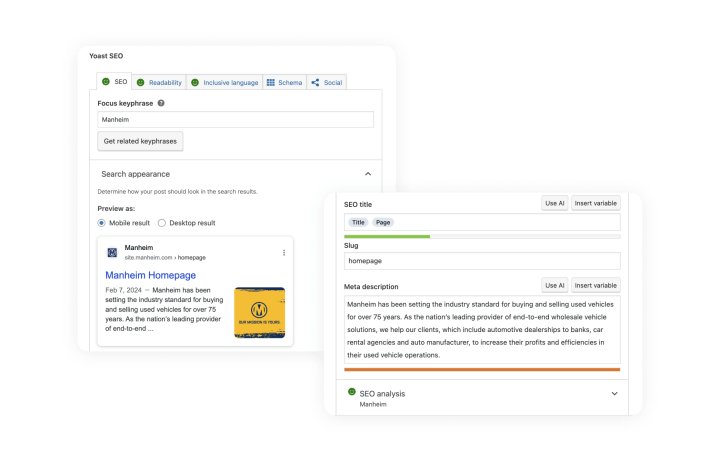
Yoast SEO in the WordPress editor lets marketers manage titles, meta descriptions, and SEO settings directly while writing, no developer required.
For many enterprise teams, that level of flexibility is enough. But what if you need to deliver the same content across multiple frontends? That’s where headless comes in.
AEM vs WordPress headless
Both platforms support headless delivery. AEM provides GraphQL and REST APIs, while WordPress offers its REST API and WPGraphQL.
But Adobe’s own approach has shifted. With the SPA Editor deprecated and Edge Delivery Services focused on pre-rendered pages delivered from the edge, Adobe is moving away from fully separate frontends as its default approach.
We’ve seen a similar pattern in our client work. In our experience, at least 95% of enterprise teams don’t need a headless architecture. A well-built traditional or hybrid WordPress setup can deliver the performance and flexibility most companies need with less complexity.
But headless still makes sense in specific cases. If the same content needs to power an app, multiple devices, and several frontends, separating the content layer can be useful.
When a client genuinely needs that setup, we build it with our SnapWP framework for headless WordPress.
So if headless isn’t necessary for most teams, what does a simpler setup mean for security and ongoing maintenance?
AEM vs WordPress security
Both platforms can meet enterprise security requirements. The bigger difference is how security is maintained over time.
Adobe manages AEM security through service packs on 6.5 and continuous updates on Cloud Service. For 6.5 customers, that means the support calendar is now an important part of the security picture. Managed Services customers are already beyond standard support, while on-premises customers need to move to LTS or Cloud Service before February 2027 to continue receiving regular patches.
WordPress combines a dedicated core security team, regular releases, and open code reviewed by a large developer community.
At the enterprise level, hosting is just as important as the CMS itself. WordPress VIP adds code review before deployment, continuous monitoring, DDoS protection, and compliance certifications including SOC 2 Type II. rtCamp is also SOC 2 Type II compliant and ISO 27001 certified.
In practice, many security problems come down to implementation and operations rather than the CMS alone. Plugin governance, code review, access control, hosting, and deployment practices all matter.
Once security is settled, personalization is often the next question, because it’s where AEM’s advantage is clearest.
AEM vs WordPress personalization
Personalization is one area where AEM has an advantage. AEM’s native tools, combined with Adobe Target, support behavioural targeting, A/B testing, and AI-driven recommendations. Adobe is also moving more personalization closer to the visitor through Edge Functions on its managed CDN.
The more important question is whether your company actually uses these capabilities. In the AEM estates we assess, we often see Target licensed for a small number of tests or not deployed at all. If that’s your situation, you may be paying for a personalization stack that isn’t generating enough value to justify its cost.
WordPress gives you several options.
You can keep using Adobe Target, which works with WordPress, or connect another personalization platform. You can also build AI-led personalization on infrastructure you control.
That second approach can reduce your dependence on another large vendor contract, particularly when personalization add-ons make up a significant part of an Adobe agreement.
Now, let’s talk about AI and how both platforms are ready for its adoption.
AEM vs WordPress AI readiness
Adobe has moved quickly on AI, and its recent AEM releases include some useful capabilities.
The 2026 releases added AI agents to the authoring workflow, AI-powered semantic search in AEM Assets, and a Content MCP Server that allows external AI tools to read and update AEM content.

AEM MCP can search, create, edit, and publish content, assets, and pages under the user’s existing AEM permissions. Source: Adobe
For teams already on Cloud Service and committed to the Adobe ecosystem, these features can be useful.
The trade-off is that access depends on your deployment model. AI agents are available on Cloud Service and Edge Delivery Services, are being introduced gradually to LTS on Managed Services, and aren’t planned for on-premise deployments. They also come through a separate SKU.
WordPress 7.0’s AI infrastructure is part of WordPress core, while the choice of models remains open. Site owners connect their preferred AI providers, and plugins built on the AI Client can use those connections.

OpenAI, Anthropic, and Google are supported out of the box, with other providers available through plugins.
At rtCamp, we look at AI readiness through the 5 AI Dimensions Framework:
- Content discovery on LLMs (AEO)
- AI-led editorial
- AI-led personalization
- WordPress as an AI-integrated platform
- AI-accelerated development
All five depend on the platform underneath them. Content needs to be structured, integrations need to work, and teams need clear rules around what AI can publish or change.
That foundation matters more than any AI feature. S&P Global found that 42% of companies abandoned most of their AI initiatives in 2025, up from 17% the year before. When AI projects stall, the problem is often the underlying platform: unstructured content, disconnected systems, or no governance around AI-generated changes.
That’s why we build AI readiness into AEM migrations from the start. The content model, integrations, and editorial governance are established during migration and become the foundation for future AI capabilities.
Now as we’ve seen all core differences between AEM and WordPress, let’s sum up.
AEM vs WordPress: Which platform fits your situation?
There isn’t one answer for every enterprise. If your company actively uses the wider Adobe Experience Cloud including Sites, Assets, Analytics, Target, and Experience Platform and your teams depend on how those products work together, AEM fits better.
The same applies if you’ve already committed to Cloud Service and Edge Delivery Services and are comfortable with Adobe’s roadmap and pricing. In those cases, the cost of staying on AEM may be justified by capabilities you use.
But for teams that mainly use AEM for content management and publishing, it’s different. Teams may be looking at a move from 6.5 to LTS or Cloud Service now, followed by another architectural move later. In that situation, it’s worth comparing the full cost of that path with the cost of moving once to a platform that fits your current needs.
How enterprises migrate from AEM to WordPress
If you decide to move, the migration doesn’t have to mean switching everything at once.
We run AEM migrations through The Delivery Model, a phased approach designed to keep the live site running throughout the project.
It starts with an audit of the existing estate and how it’s actually being used. From there, we run a pilot on a contained part of the estate before moving into the wider build, team enablement, launch, and post-launch support.
For Videojet, part of Danaher, we migrated 28 websites, more than 12,000 pages, and 22 languages from end-of-life Adobe CQ5 to WordPress without marketing downtime.
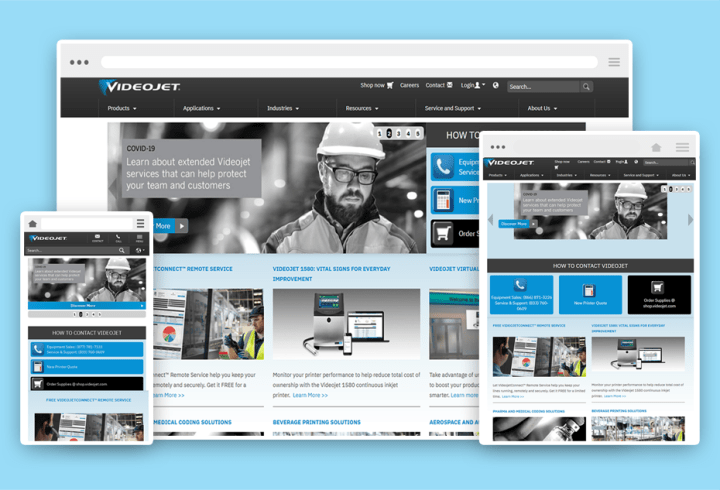
The project included digital asset migration and custom blocks that gave the marketing team more control over content.
Manheim and Dealertrack followed similar paths within Cox Automotive.
AEM migrations also involve a few platform-specific decisions, so we address them during the audit rather than leaving them until the end.
Content Fragments can map to WordPress custom post types and fields, which allows structured content to retain its structure. AEM Assets can move to the WordPress media library with metadata preserved, or to a dedicated DAM when that’s a better fit.
Adobe Analytics can stay in place because it works with WordPress, or it can be replaced if another analytics platform makes more sense.
Our AEM to WordPress migration guide covers these steps in more detail.
Start with 20 hours of free discovery
rtCamp is an enterprise open-source platform engineering company, and we’ve been building on WordPress for more than 17 years.
We can map your current architecture, identify which capabilities your team uses, and help you build the internal business case before you commit to anything. And if AEM turns out to be the right answer for your organization, we’ll tell you.
Get a free AEM migration blueprint
We offer 20 hours of free discovery, so you’ll know the scope, risks, and timeline upfront.
FAQs
Is WordPress ready for enterprise use at AEM’s scale?
Yes, when it is architected and hosted for enterprise use. WordPress powers around 43% of all websites, and organizations including Penske Media, Al Jazeera, and Cox Automotive run it at high traffic on managed platforms such as WordPress VIP.
Is WordPress as secure as AEM?
Both can meet enterprise security requirements. WordPress combines a dedicated core security team and regular releases with platform-level security from hosts such as WordPress VIP, which holds certifications including SOC 2 Type II. In practice, the way a site is built and operated has a major impact on security.
Is AEM better for personalization?
Out of the box, AEM offers stronger native personalization through its integration with Adobe Target. The question is how much of that functionality your organization uses. WordPress can integrate with Target or support AI-led personalization through infrastructure you control.
Should we move to AEM 6.5 LTS instead of migrating?
LTS keeps you supported and can give your team more time to plan. That can make sense if you first need to stabilize your current platform. It doesn’t eliminate the possibility of a later move to Cloud Service or Edge Delivery Services, and on-premise LTS won’t receive Adobe’s AI agents.
If you expect to migrate eventually, compare the full cost of that path with the cost of completing one migration now.
What does an AEM to WordPress migration cost?
It depends on the number of sites, languages, integrations, and custom functionality involved.
We scope these factors during the free 20-hour discovery so you can build a realistic business case before signing a contract. Here you can request a platform audit.
Do we lose Adobe Analytics if we migrate?
No. Adobe Analytics can work independently of AEM and can be deployed on a WordPress site through Adobe’s tag management. You can keep using it or move to another analytics platform if that better fits your needs.
Can WordPress replace the full Adobe DXP?
If your organization relies on Analytics, Target, or Experience Platform, you can keep those tools connected to WordPress or evaluate alternatives for each one. The goal is to decide which parts of the Adobe stack still deliver enough value to keep.
TL;DR
AEM in 2026: What has changed
Enterprise WordPress today and what it offers
AEM vs WordPress at a glance
AEM vs WordPress costs compared
AEM vs WordPress architecture: How much complexity do you need?
Editorial experience on AEM vs WordPress
AEM vs WordPress headless
AEM vs WordPress security
AEM vs WordPress personalization
AEM vs WordPress AI readiness
AEM vs WordPress: Which platform fits your situation?
How enterprises migrate from AEM to WordPress
Start with 20 hours of free discovery
Get a free AEM migration blueprint
FAQs
Is WordPress ready for enterprise use at AEM's scale?
Is WordPress as secure as AEM?
Is AEM better for personalization?
Should we move to AEM 6.5 LTS instead of migrating?
What does an AEM to WordPress migration cost?
Do we lose Adobe Analytics if we migrate?
Can WordPress replace the full Adobe DXP?
On this page
Credits

Mackenzie Hartung
Author
Mackenzie Hartung
Author
Mackenzie Hartung is the Chief Delivery Officer at rtCamp, where she oversees the delivery strategy, processes, and teams that power enterprise WordPress engagements. With over a decade of experien…

Aviral Mittal
Editor
Aviral Mittal
Editor
Aviral Mittal is the Chief Marketing Officer at rtCamp, where he established and leads the marketing function, building and growing a team of 20+ specialists across content, SEO, design, and growth…
Related articles
Comments
Leave a Reply Cancel reply
Name*
Email*
Comment*
Submit
Δ