What is INP ?
- Interaction to Next Paint revolves around how quickly the page responds to the user interactions on a page which is then considered into calculating the overall INP score of that page by Google Chrome’s lab data and field data.
- INP in Core Web Vitals is a new metric designed to provide a representation of the overall interaction delay of a page.
- It does this by identifying from a sample, the single longest interactions that happened throughout a user’s visit to the page.
- To visualize what INP Core Web Vitals stands for and what interaction delay feels like, read about it on the Google Codelabs.
How do search engines measure INP scores?
- For pages that have less interaction, the worst latency is reported as final INP score.
- For pages that have a high number of interactions, INP will be sampled, and longest interaction will be ignored from every 50 interactions.
INP vs FID: Why did INP replace FID ?
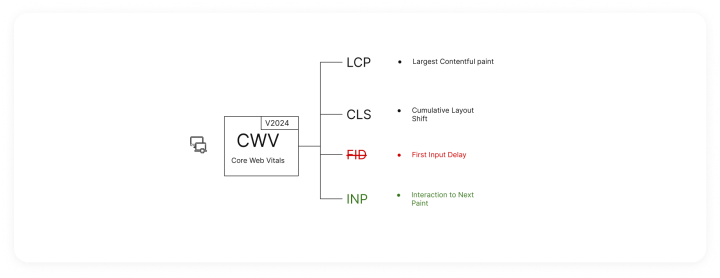
- This is a replacement of deprecated CWV – FID (First Input Delay).
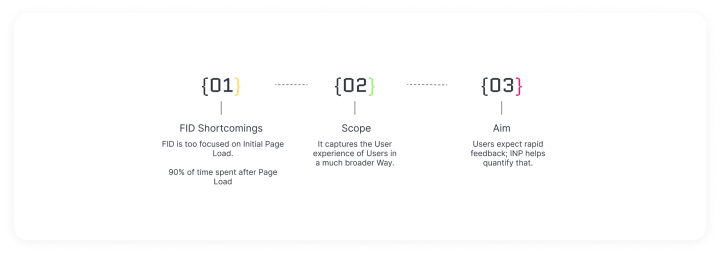
- FID simply measures only input delay it took to run the corresponding event handlers and does not give a complete idea of rapidness of visual feedback.
Poor responsive Good Responsive website example
- Rage clicks occur when users click repeatedly on a particular element or certain area of your app or website over a short period of time, usually less than a minute.
SEO Implications
- Core Web Vital: Google considers INP a Core Web Vital, meaning it directly influences search rankings. Websites with faster INP tend to rank higher.
- User Experience Signal: A low INP signifies a responsive and user-friendly website. This translates to better user engagement, lower bounce rates, and longer session times – all what is interaction to next paint
- Positive SEO signals.
- Focus on Interaction: INP goes beyond just loading speed. It measures user interaction, reflecting how quickly the website reacts to user actions. This shift emphasizes user experience as a key ranking factor. By checking the above, you can detect Core Web Vitals INP issue on your website.
Let’s get to the Basics
Source: Web.dev
As far as INP goes, only the following interaction types are observed:
- Clicking with a mouse.
- Tapping on a device with a touchscreen.
- Pressing a key on either a physical or onscreen keyboard.
Standards
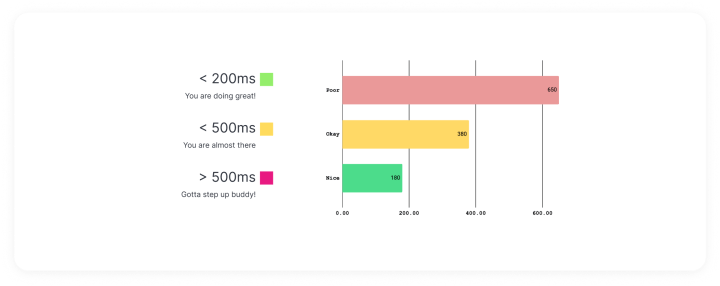
Google standardized that a good INP value should be 200 milliseconds or less.
What constitutes INP scores ?
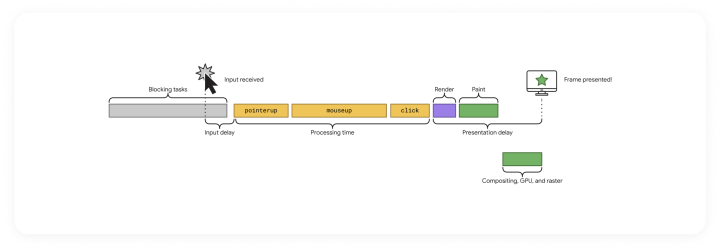
- Each interaction has a few phases: presentation time, processing time, and input delay.
- The callback of associated events contains the total time involved for all three phases to execute.
- The longest duration of a logical user interaction is what will be recorded.
How to find INP issues?
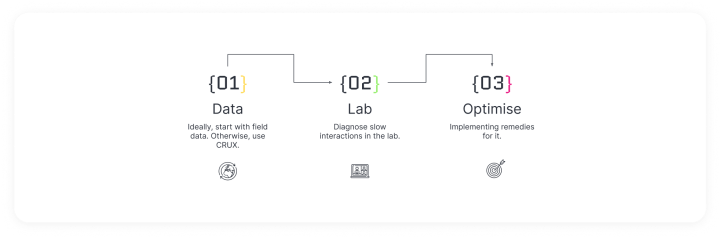
- To tackle Interaction to Next Paint (INP) issues, start by gathering real-world performance data. Use RUM Tools like DebugBear or other tools like CrUX Report and Google Search Console to identify where slow interactions are happening.
- Next, diagnose the causes of these slow interactions in a controlled environment. PageSpeed Insights can analyze your site and provide actionable suggestions, However, a more accurate action would be to replicate the same issues in your local device with the Web Vitals Chrome Extension which shows INP metrics in real-time.
- Finally, optimize your site by implementing the suggested improvements. Use tools like DebugBear to simultaneously monitor the impact of these changes and ensure your site becomes more responsive.
Tools for Identifying INP Score
You can use a number of tools to assist you in improving Interaction to Next Paint, for example:
-
RUM Tools – DebugBear– To collect RUM data in detail along with the device configuration and detail about which element is contributing to the higher INP score in that particular page. [Doesn’t collect iframe interaction data].
-
PageSpeed Insights – Detailed report of a particular page based on RUM data over a period of 28 days. Along with some suggestions to improve the CWV score as a whole and optimise page performance.
-
Google Search Console – To collect RUM data for overall page score along with the interactions done in iframe inside those pages.
-
The Web Vitals library – Can be used to run local lab test and accurately measure each interaction done on the page and it’s corresponding CWV score with the provided functions.
-
Web Vital Chrome Extension (Enable console logging from plugin options)- The easier and preferred way of measuring INP during lab test, similar to the above library.
-
Crux Report– This is a collective report of the data collected from all over the world about UX of a particular site. Prepares report based on page URL. More like an overall performance of a website.
-
In order to find INP issues on a website, we must first consider the differences between lab data and field data.
-
The only way to find realistic data on what your users are experiencing is to utilize data from the field.
-
Lab tools are items that are not going to provide a complete picture but instead help simulate known problems, and thus usually need manual input while measuring tasks are being performed.
-
About Lab Data
- In the context of this INP testing, lab data is a metric that’s determined through controlling page load using a predefined set of conditions, usually tailored to device and network.
- Because these conditions are in a controlled environment, they are known as a lab environment, and this is where the term “lab data” comes from.
-
About Field Data
- Field data, also known as RUM (Real User Monitoring) data, is obtained by monitoring users on a page.
- It measures the performance metrics of individual performances, often providing insight into these certain performance metrics.
- Field data is based on real user visits – so this is something where your website may be represented on actual devices, user geographic locations, as well as network conditions of that device.
Techniques to identify INP bottlenecks
Let’s make use of the above mentioned tools to find INP issues.
-
Let’s say if you have Field data, the process simplifies as you have the interactions that are slow, you can directly jump to optimizing those interactions, but if you don’t you will have to take a trial and error approach to identifying the issues.
-
First we will enable the Web Vitals extension along with console logging.
- Install Web Vitals extension.

Source: Chrome web store
- Pin the extension and right click the extension and go to options.
- Check Console Logging and click Save.

Now you will be able to see the interactions breakdown in your console.
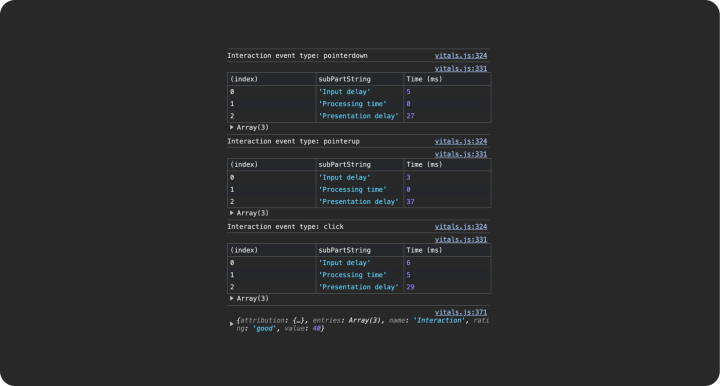
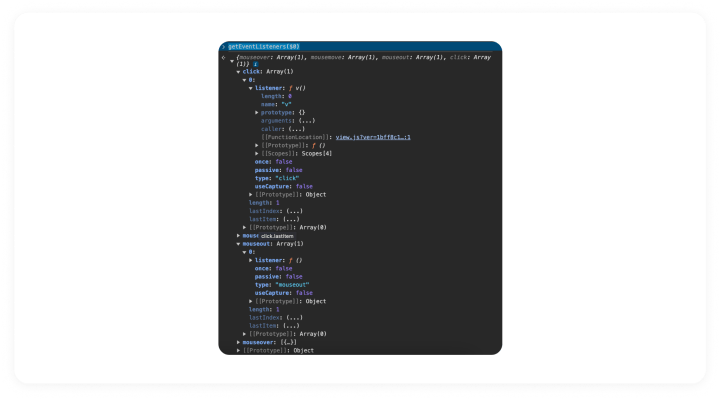
The next step would be to identify the event listeners for a particular element on the page.
- Inspect the element you want to get the list of handlers for and select it.
- Switch to console Tab and type the following.
getEventListeners($0)
- $0 is a console utility that returns the most recently selected element or JavaScript object. See Console Utilities API reference
- getEventListeners() returns the event listeners registered on that specific element/object.
- You can also click get to the source code of the event listener by clicking on its JS reference provided in the result.
- Once an issue is identified, we can simulate it to be able to understand the intricacies of the issue.
- Performance Panel is of significant help in delving into the root causes.
- A general rule of thumb is that INP issues will mostly be prominent on mobile devices, and if improved for mobile devices, it will also automatically correlate to better INP scores on desktop. Therefore, to simulate INP scores, you can throttle the performance of your device by switching on some options such as network, CPU, For most developers using high end machines, you can switch Network throttling to “Slow 3G” & CPU to “6x slowdown”.

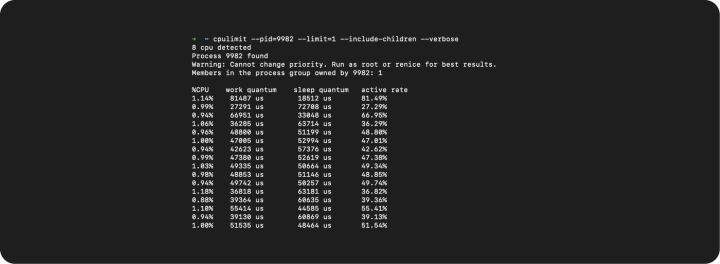
- Still not throttled enough? you can utilize utils like cpulimit to manually throttle the performance of chrome tabs, in order to mimic low-end device performance.
- Now interact with the page after turning on the recording on the Performance panel and look for interactions with a red highlight indicating long tasks.
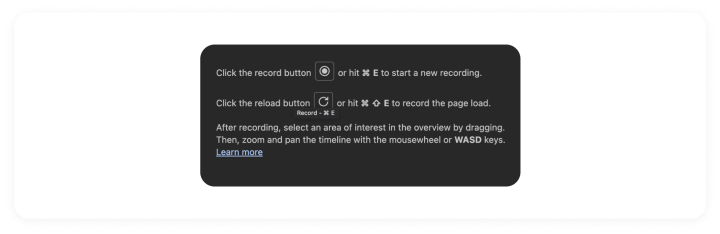
- Hovering over these also reveals tooltips to identify what kind of processing is taking the longest time.

- Dissect the tasks comprising the long task by clicking on it, and try to identify the code that is causing this task to run. You may find the “Initiated by” field helpful to identify what triggered the particular task, moreover, once you identify the source trigger you can look at the corresponding code by clicking on the code lines to reveal the source code, in case of minified JS files, try to use source maps or else similar implementation in your code to optimize it.


How to improve interaction to next paint with proven INP Optimization techniques
- Red stripes are Input delays shown in the Performance Panel.

Audit 3P scripts eliminate unwanted ones, and defer others. Prioritize loading first party scripts
From experience, it has been observed that loading 3P scripts synchronously leads to blocking the main thread during page loads and unresponsive elements on the page subsequently leading to poor INP scores. There can be instances where your code is optimized but still you are not able to resolve INP issues. In such cases, it can be traced to 3P scripts that if not handled correctly block main thread on slow 3G android mobile phones that have low CPU capabilities and can’t load/execute scripts as fast as desktops (strange, but we live in a mobile first world, and most media publishing sites have larger mobile users).
Break up Tasks
For synchronous event handlers, prioritize UI handling logic first and later backend or state update tasks. This can be achieved by creating a small helper function that pushes the execution of remaining tasks at the end of the main thread. The helper function uses a setTimeout with a delay of 0 seconds which resolves to a promise.
			function yieldToMain () {
  return new Promise(resolve => {
    setTimeout(resolve, 0);
  });
}

// Use it in you code everywhere to break up synchronous tasks.

// Loop over the tasks:
while (tasks.length > 0) {

  // Shift the first task off the tasks array:
  const task = tasks.shift();

  // Run the task:
  task();

  // Yield to the main thread:
  await yieldToMain();
}
Use FastDOM to avoid layout re-flows
FastDOM is a JavaScript library designed to optimize the performance of DOM manipulation and layout operations. It provides a way to batch and schedule DOM read and write operations to minimize browser reflows and repaints, ultimately improving the responsiveness and perceived speed of web applications. FastDOM schedules DOM operations asynchronously using requestAnimationFrame. FastDOM collects multiple DOM manipulation tasks and queues them for execution within a single animation frame. This batching process allows FastDOM to consolidate multiple DOM reads and writes into a single batch, reducing overhead and improving performance. This synchronization helps avoid forced synchronous layouts and ensures a smooth user experience.
Debouncing/display small CSS loading animations
For SPAs with search bars, that makes API calls to display search results, implement small loading animations with CSS (search loading animations CSS, there is a W3schools article) to provide visual feedback to the user.
Breaks JS scripts
Each <script> element initiates a task to evaluate the associated script, involving parsing, compilation, and execution. Using a bundler to consolidate scripts into a single file results in a more efficient task dispatching model. Instead of numerous tasks for each script, a single task is dispatched to evaluate the bundled script, streamlining the process. You can break up script evaluation work by avoiding loading large chunks of JavaScript, and load more individual, smaller scripts using additional <script> elements. A limit of 100 kilobytes per individual script is a good target.
Loading scripts with dynamic imports
- In contrast to static import statements, which must be placed at the top of an ES module, dynamic import() calls offer more flexibility by allowing developers to load chunks of JavaScript on demand from any part of the script. This versatility presents two significant advantages:-
- By deferring the loading of modules until they are needed, dynamic import() calls help alleviate main thread contention during the initial page load. This is particularly beneficial for larger applications with numerous modules, as it prevents the main thread from becoming overwhelmed with compilation and evaluation tasks all at once. Instead, modules are loaded asynchronously as they are required, allowing the main thread to focus on critical tasks such as rendering the user interface.
- Each dynamic import() call initiates a separate task for the compilation and evaluation of the imported module. This separation of tasks ensures that the main thread remains responsive and can handle other user interactions while modules are being loaded and executed.
Harnessing Web Workers
We had amazing INP gains when we started to leverage web workers to offload tasks from the main thread, enabling parallel execution and a more responsive user experience. By delegating certain tasks to separate threads, the main thread remains agile and responsive to user interactions.
A simple example of a Web worker is
main.js
			const worker = new Worker('./worker.js');

worker.postMessage([40, 2]);

worker.addEventListener('message', event => {
  console.log(event.data);
});
worker.js
			addEventListener('message', event => {
  const [a, b] = event.data;

  // Do stuff with the message
  postMessage(a + b);
});
There are many libraries that make working with Web Workers easy like comlink. If you are thinking about how to improve interaction to the next paint in WordPress, we’ve got you covered, check out wp-partytown.
Lazy load below the fold elements
Lazy loading below-the-fold elements is a technique used to defer the loading of images, iframes, or other resources that are not immediately visible when a user first loads a web page. This helps improve initial page load performance by reducing the amount of data transferred and speeding up rendering. Use the Intersection Observer API to monitor when the below-the-fold elements come into view. Intersection Observer allows you to efficiently track the visibility of elements relative to the viewport.
Reduce DOM size
Minimize the nesting depth of DOM elements. Deeply nested structures can increase rendering and layout times. Flatten your DOM hierarchy whenever possible. Regularly audit your DOM structure and remove any elements or scripts that are no longer necessary. Unused elements contribute to DOM bloat and increase processing time. Minimize the use of inline styles and scripts. Instead, use external stylesheets and scripts to cache resources and reduce the size of the initial HTML payload.
Using CSS solutions
Replacing JS based interactive events with simpler HTML and CSS alternatives. A prominent use case can be of using a collapsable hamburger menu which is primarily done using the click event in JS. It can easily be replicated using a checkbox input and CSS attribute to trigger the menu action. A simple reference provided as example of Pure CSS Hamburger Menu. This solution utilizes the checked pseudo class of input element to trigger the collapse action.
Avoiding methods that cause layout thrashing
There are a bunch of methods like clientHeight andoffsetWidth that cause browsers to recalculate the layout and style it synchronously causing the main thread to be blocked. A list of such methods are mentioned in a resource about what forces layout/reflow and should be avoided.
Conclusion
Google’s continuous updates to its page experience metrics underscore the importance of adapting to new standards like Interaction to Next Paint (INP). As a crucial measure of web page responsiveness, understanding INP and actively optimizing for it and other Core Web Vitals is essential for SEO success. Make use of the tools and strategies at your disposal to refine your website’s performance thoughtfully.
However, it’s crucial to avoid over-optimizing for INP at the expense of overall user experience. Excessive focus on any single metric could potentially disrupt the balance of your site, leading to a degraded user experience. Always aim for a holistic approach that enhances your website’s functionality and appeal while keeping pace with SEO developments.
What is INP ?
INP vs FID: Why did INP replace FID ?
Poor responsive Good Responsive website example
SEO Implications
Let’s get to the Basics
What constitutes INP scores ?
How to find INP issues?
Tools for Identifying INP Score
Techniques to identify INP bottlenecks
How to improve interaction to next paint with proven INP Optimization techniques
Audit 3P scripts eliminate unwanted ones, and defer others. Prioritize loading first party scripts
Break up Tasks
Use FastDOM to avoid layout re-flows
Debouncing/display small CSS loading animations
Breaks JS scripts
Loading scripts with dynamic imports
Harnessing Web Workers
Lazy load below the fold elements
Reduce DOM size
Using CSS solutions
Avoiding methods that cause layout thrashing
Conclusion
On this page
Credits

Takshil Kunadia
Author
Takshil Kunadia
Author

Lovekesh Kumar
Author
Lovekesh Kumar
Author

Pradeep Sonawane
Author
Pradeep Sonawane
Author
Pradeep Sonawane, Director of Engineering at rtCamp, leads teams building scalable, high-performance enterprise web solutions for global brands.
Related articles
-
Enterprise guide to migrating from Strapi to WordPress
Articles
-
Outgrew DIY WordPress? Here’s when to hire an expert WordPress developer
Articles
Comments
Leave a Reply Cancel reply
Name*
Email*
Comment*
Submit
Δ