Managing multiple brand websites under one umbrella demands efficiency, consistency, and reliability. If your organization leverages WordPress for its multi-brand architecture, Continuous Integration and Continuous Deployment (CI/CD) practices are not only beneficial but also transformative. This guide explores how you can use CI/CD to streamline your operations, exemplified by a robust plugin management system.
What is CI/CD?
Continuous Integration (CI) is a development practice where developers frequently merge their code changes into a repository. Each merge then triggers an automated build and test sequence. The primary goals of CI are to find and address bugs quickly, improve software quality, and reduce the time it takes to validate and release new software updates.
Continuous Deployment (CD) extends CI. It’s a practice where code changes that pass all automated tests automatically deploy to a production environment (or a staging environment). This automates your release process, enabling rapid and reliable delivery of features and fixes.
Together, CI/CD forms an automated pipeline from commit to deploy, enabling frequent, reliable, and low-risk releases across WordPress enterprise CI/CD workflows.
Understanding multi-brand WordPress architecture
A multi-brand WordPress architecture refers to a setup where your organization manages multiple distinct websites, often representing different brands, products, or regions, all built on the WordPress platform. You’ll typically encounter two common approaches:
Single WordPress multisite
This approach uses WordPress’s built-in Multisite feature to create a network of sites from a single WordPress installation. All sites in the network share the same WordPress core files, themes, and plugins, though you can activate them on a per-site basis. This can simplify updates for core, themes, and plugins across the network.
Multiple independent WordPress sites
Each brand or entity has its own separate WordPress installation. This offers greater isolation and flexibility per site but can increase the complexity of managing updates, security, and consistency across all sites.
Common scenarios include
- Corporate groups with sub-brands: A parent company managing distinct websites for its various brands.
- Publishers with multiple titles: A media company running separate sites for different magazines or news outlets.
- Regional/localized versions of brand sites: A global brand offering tailored websites for different countries or languages.
Why you can’t scale multi-brand WordPress without CI/CD
For organizations managing a multi-brand WordPress portfolio, especially with multiple independent sites, CI/CD offers clear advantages:
- Consistency: Ensures all your brand sites receive updates (core, themes, plugins) in a standardized and controlled manner.
- Efficiency: Automates repetitive tasks like testing, building, and preparing deployments, freeing up your development teams.
- Reduced risk through review: Automated processes combined with review gates (like Pull Requests) minimize the chance of introducing breaking changes across multiple live sites.
- Speed with safety: Accelerates the delivery of new features and patches to all your brand sites, while maintaining control.
- Security: CI/CD pipelines help prevent security vulnerabilities by ensuring regular updates (learn more about WordPress security best practices).
- Scalability: Makes it easier for you to manage a growing number of brand sites without a proportional increase in manual effort.
- Centralized control: Allows for oversight and governance of the codebase and deployments across your entire portfolio.
Without CI/CD, managing updates, especially for critical components like plugins, across numerous sites, can become a logistical nightmare. Teams face slow WordPress deployment processes, inconsistent environments, and increased security vulnerabilities from updates.
A real-world CI/CD example: How we manage safe plugin deployments across brands
To illustrate a practical CI/CD pipeline with an emphasis on safety for multi-brand WordPress plugin management, let’s explore an alternative approach: the Centralized Plugin Management system. This prioritizes a Pull Request (PR) based workflow for distributing plugin updates.
Keeping plugins in sync and managing their deployment consistently and safely across your diverse digital portfolio.
1. Centralized plugin repository (your single source of truth):
You maintain one central Git repository (e.g., centralized-plugins) to house all unique plugins. This repository is the definitive source for all your plugin code.
			COMPANY_NAME/
├── plugin-1/
├── plugin-2/
├── plugin-3-5.1/  # Versioning can be part of the structure
└── brand-activation-plugin/      # The core Centralized orchestrator plugin
When developers commit changes here (new plugin updates), this action initiates the CI process. (Explained in detail in point #3)
2. Brand-specific activation
A custom “Centralized” plugin (brand-activation-plugin), also residing in the central repository, contains logic to determine which plugins should be active for a specific brand.
You create simple PHP configuration files (e.g.,your-brand-name.php) within this plugin to define the active plugin set for each brand, using WordPress VIP compatible functions like wpcom_vip_load_plugin().
			// Example: your-brand-name.php
<?php
return [
    'plugin-1/plugin-1.php',
    'plugin-2-5.2/plugin-2.php', // Specific version of plugin-2
];
3. GitHub actions & pull request workflow (automating updates with review)
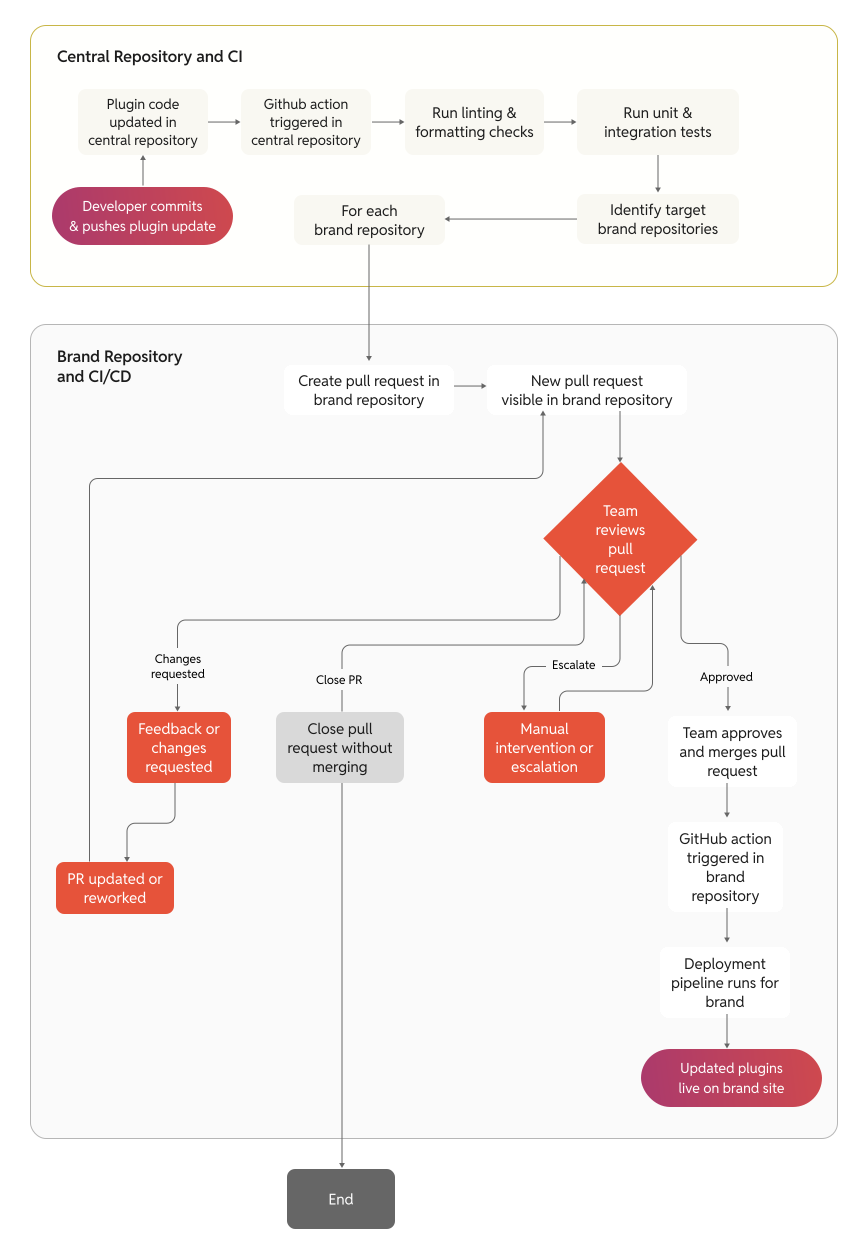
Central update & PR creation: When developers commit and push plugin updates to the central centralized-plugins repository, a GitHub Action is triggered. This Action automatically creates Pull Requests (PRs) against each relevant individual brand repository. These PRs contain the updated plugin files targeting the plugins/ directory within the brand repos.
Human review gate: Each PR created in a brand repository serves as a crucial review gate. Your team can inspect the proposed plugin changes, run automated checks (explore more on effective test automation strategies) associated with the PR (like linters or tests specific to that brand), and discuss any potential impacts before merging. This significantly helps in avoiding accidental pushes of breaking changes directly to production environments.
Controlled merging: Once your team reviews and approves a PR, they merge it into the brand repository’s main development or production branch.
Deployment trigger: Merging the PR into the designated branch of the brand repository (which is typically a wp-content repo) then triggers its own deployment pipeline (e.g., a GitHub Action or a deployment hook). This deploys the updated plugins along with any other brand-specific code to the live site.
This GitHub Action automatically creates Pull Requests (PRs) against each brand repo, following a PR-based WordPress workflow.
4. Codebase structure: How brand sites stay in sync
The brand repositories do contain the plugins/ directory with all the plugin code in their Git history. This directory is kept in sync through the PRs created by the automation from the centralized-plugins repository.
You activate the centralized plugin on each brand site (e.g., wpcom_vip_load_plugin( 'brand-activation-plugin')).
You define a brand identifier in your VIP config (e.g., define( 'BRAND_NAME', 'your-brand-name‘ )).
With this system, all plugins from the central repository are present on each brand site’s filesystem, even if not all are activated for that specific brand. This is by design:
- No performance impact: Inactive plugins do not affect your site’s performance as WordPress only loads activated ones.
- Consistency & readiness: It ensures a consistent codebase. If you decide to activate a previously unused plugin for a brand, the code is already in place.
- Simplified sync logic: It keeps the CI/CD automation simpler, as the Action doesn’t need to selectively sync individual plugin folders when creating PRs.
Why this CI/CD model works at scale
- Enhanced safety via review: The PR-based workflow introduces a vital manual review step, preventing accidental deployments of potentially breaking plugin updates directly to production.
- Simplified updates with control: Update a plugin in one place; it propagates as a reviewable PR to all relevant brand sites.
- Reduced maintenance overhead: Your team spends less time on repetitive plugin management tasks.
- Consistent environments: Standardized plugin sets and versions across all sites and environments, verified before merging.
- Reliable deployments: Automation combined with human oversight minimizes errors.
Tools we use (and why they work)
Our CI/CD pipeline for WordPress is built on a Git-based approach, making GitHub actions WordPress deployment both scalable and repeatable.
Version control with Git (on GitHub)
We use Git not just for tracking code, but for enabling safe, reviewable workflows. Platforms like GitHub and GitLab make it easy to enforce PR-based reviews, branch protections, and clear audit trails across teams.
CI/CD automation with GitHub Actions, CircleCI, or Jenkins
Automated workflows are at the heart of every deployment. Whether it’s GitHub Actions (our go-to), Jenkins for deeper customization, or CircleCI, what matters is that every code change triggers a reliable, testable, and repeatable path to production.
Enterprise-grade WordPress hosting (like WordPress VIP)
For multi-brand deployments, we recommend platforms that support scalable, Git-based workflows. WordPress VIP, for example, provides structured deployment pipelines, strong environment parity, and performance observability, critical for operating at scale.
Custom orchestration with the centralized plugin
This entire approach of central orchestration, PR-driven safety, and scalable plugin logic is part of a broader model we call OnePress. It’s not a product, it’s a framework for managing multi-brand WordPress at scale, with CI/CD best practices built in.
Best practices we follow (and recommend) in multi-brand CI/CD
We treat plugin configuration and activation logic as code, enabling structured plugin orchestration in WordPress across brands.
- Single source of truth: Maintain all shared code in a central, version-controlled repository.
- Automate where sensible, review where critical: Automate PR creation and checks, but ensure human review for production-bound changes.
- Environment parity: Keep your staging/testing environments as close to production as possible.
- Clear branching strategy: Use a consistent strategy to manage features, releases, and PR targets.
- Thorough automated testing (in PRs): Implement unit, integration, and end-to-end tests that run on PRs.
- Staged rollouts: Merge staging PRs before production. Once tested, promote to production.
- Monitor your pipelines: Implement monitoring and alerting for your CI/CD pipeline and live sites.
- Configuration as code: Manage site-specific configurations in version control.
- Prioritize security: Regularly scan dependencies. Secure your CI/CD pipeline and PR approval process.
Common mistakes to avoid
- Skipping PRs to push straight to production might save a few minutes, but it removes the safety net and increases the risk of downtime across sites.
- Approving without review is just as risky. Even automated PRs need a human to check what’s changing and why.
- No automated tests? That’s a red flag. Neglecting proper automated testing strategies increases deployment risks and can lead to fragile pipelines. (Learn about common pitfalls in test automation).
- Overcomplicated pipelines often backfire. If your CI/CD flow is too hard to understand, it won’t be used correctly or at all.
- No rollback plan means a bad deploy stays live longer than it should. Always build with reversibility in mind.
- Environment mismatch between staging and production causes sneaky bugs. What passes in testing might still fail live if the environments drift apart.
Confident, controlled deployments at scale
Implementing a PR-driven CI/CD pipeline for your multi-brand WordPress architecture, like the centralized plugin management system described, offers a powerful balance of automation and safety. By centralizing plugin code for all brands, automating the creation of reviewable Pull Requests, and adhering to best practices, you significantly reduce operational burdens and deployment risks. This empowers your teams to manage updates confidently, ensuring consistency and quality across all your brands while preventing accidental disruptions to your live environments.Interested in implementing a robust CI/CD system for your multi-brand WordPress organization? At rtCamp, we specialize in enterprise WordPress solutions, including custom CI/CD pipelines tailored to your unique needs. Contact us to learn how we can help you streamline your deployments and enhance your WordPress operations with confidence.
What is CI/CD?
Understanding multi-brand WordPress architecture
Single WordPress multisite
Multiple independent WordPress sites
Why you can’t scale multi-brand WordPress without CI/CD
A real-world CI/CD example: How we manage safe plugin deployments across brands
1. Centralized plugin repository (your single source of truth):
2. Brand-specific activation
3. GitHub actions & pull request workflow (automating updates with review)
4. Codebase structure: How brand sites stay in sync
Why this CI/CD model works at scale
Tools we use (and why they work)
Version control with Git (on GitHub)
CI/CD automation with GitHub Actions, CircleCI, or Jenkins
Enterprise-grade WordPress hosting (like WordPress VIP)
Custom orchestration with the centralized plugin
Best practices we follow (and recommend) in multi-brand CI/CD
Common mistakes to avoid
Confident, controlled deployments at scale
On this page
Credits

Riddhesh Sanghvi
Author
Riddhesh Sanghvi
Author

Shreya Agarwal
Editor
Shreya Agarwal
Editor
Shreya Agarwal is a Growth Engineer at rtCamp, she brings active, hands-on WordPress development credentials to everything she writes and reviews. A WordPress Core Contributor with merged pull requ…
Contributions and Updates: Dishit 
Related articles
-
WordPress as a product: Engineering composable infrastructure for the enterprise
Articles
-
How multi-brand teams eliminate content duplication with a shared content hub
Articles
Comments
Leave a Reply Cancel reply
Name*
Email*
Comment*
Submit
Δ