rtPanel is all about the faster and efficient performance with optimized codes. We are glad to announce rtSocial plugin as an extension to our commitment.
rtSocial is a social sharing plugin, which offers Facebook and Twitter buttons with different styles, alignments and manual placements options.
The USP:
Unlike traditional social sharing buttons, which loads the iframe and these iframes increases page-size and slows-down your website. rtSocial has found a new way to do that.
rtSocial uses non blocking JavaScript to get all the data in one shot, and injects them in the mark-up. And as it uses a single sprite with all the images required, hence eliminating the need to load the images from the service provider’s CDN. It makes it more efficient and loads faster. 🙂
Features:
1. Placements: You can choose the options to place the buttons as per your own desires. We have provided options for Top, Bottom and Manual placements of sharing buttons.
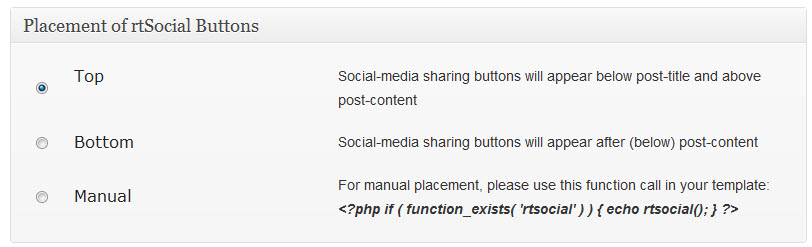
rtSocial Buttons’ placements
2. Buttons Style: You can select the button style as per desired alignment.
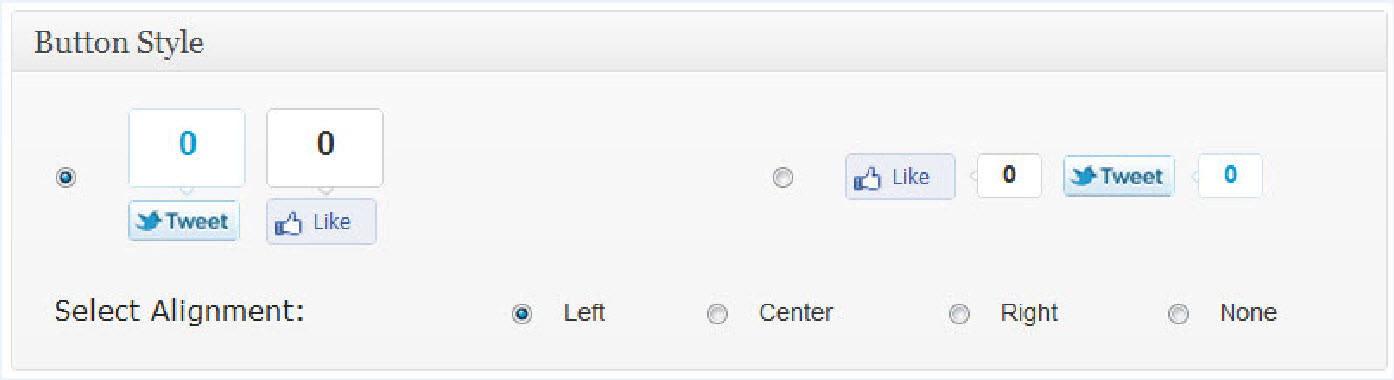
rtSocial Button Style
3. Twitter and Facebook Button Settings: You can choose the respective settings for Facebook and Twitter buttons. For twitter you can provide both mail twitter handle and related handle.
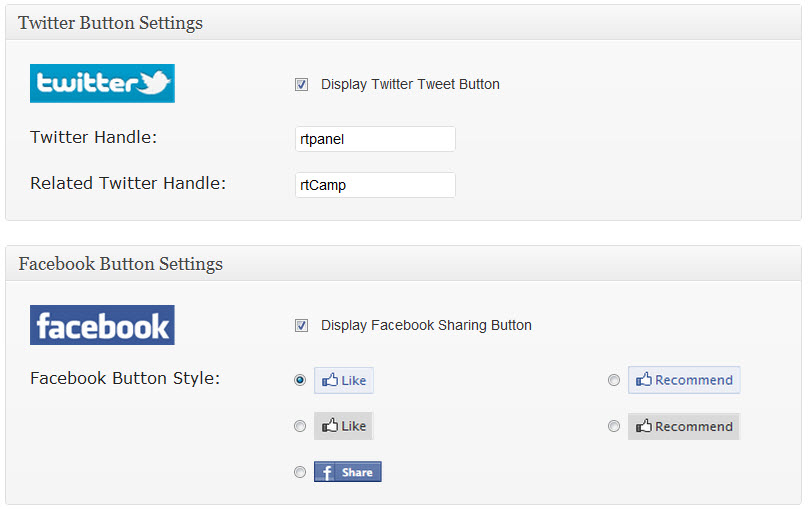
rtSocial Twitter & Facebook Buttons’ Settings
We are using this plugin in our own blog network and it works awesome. Use of Social Sharing Buttons are more efficient, faster and better with rtSocial.
rtSocial plugin is compatible with all WordPress themes and Theme Frameworks.
We are awaiting feedback and experience from users. For any questions, suggestions and support, visit our Support Forum.
Cheers.
Important Links:
The USP:
Important Links:
On this page
WordPress plugin, rtSocial, Archive
Credits

Gajanan Sapate
Author
Gajanan Sapate
Author
Marketing Enthusiast@ rtCamp. Love Blogging 🙂
Related articles
-
rtSocial 2.0 with Google+, Pinterest, LinkedIn Support
News
-
rtSocial Plugin Page with Custom Header
News
Comments
-
Martin
This looks really nice. What I think is missing is the addition of Google Plus. Any chance that you will add that in a future update?
Reply
-
Gajanan
Thank you Martin.
Google Plus will be added soon in upcoming updates. So stay tuned. 🙂
Reply
-
-
Adam Saverian
Wow, what a great plugin. Let me applaud you for making the BEST social sharing plugin for wordpress. The simple fact is, the rest of the plugins are horrible because they increase load time dramatically.
One BIG problem though. For some reason it’s destroying my “about the author” section at the bottom of my post, regardless of where I place the rtSocial plugin. For some reason the whole “about the author” section is gone and my related posts and ads at the bottom of my page are all messed up. Not sure what’s causing it, except that when I deactivate rtSocial my page loads correctly.
Anyway, I’m using a theme-junkie theme called “smart blog” if you’re interested in checking out this problem.
Reply
-
Gajanan
Hi Adam.
Good to know that you like the rtSocial Sharing Plugin. 🙂
I would appreciate if you ask your question in Support Forum. Answer to your question will be a helpful resource to rest of the community as well.
Cheers.
Reply
-
adamsaverian
I posted the question in the forum and have yet to get an answer. I know it’s the weekend, so no big deal. However, I really would like to use your plugin it’s the only one that doesn’t slow down my page loads. I want to talk about it on my podcast and write about it on my blog! But I’d like to fix it first.
Reply
-
-
-
adamsaverian
I posted the question in the support forum
Reply
-
Blasfemo
Hi Gajanan, thanks for release this plugin. My web load fast and i can add social buttons tu my post. I hope that you add support for Tumblr share button 😀
PS: Sorry for my bad english, i speak spanish
Reply


Leave a Reply Cancel reply
Name*
Email*
Comment*
Submit
Δ