/handbook/client/when-we-deliver/
What We Do
Digital Platform MigrationsKey SolutionsManaged ServicesStaffing SolutionsIndustriesProducts


OnePress
Unify multiple brands on one governed WordPress platform.

Design & UI/UX
Gutenberg-native UX, UI, and design systems for visitors and editors.

WordPress Modernization
Modernize WordPress for better performance, architecture, and AI readiness.

WordPress as a DXP
WordPress as a composable DXP when monolithic systems no longer cut it.

Headless WordPress
Omnichannel content delivery without sacrificing marketing autonomy.

Frappe/ERPNext
Build scalable ERP and custom applications, from implementation to ongoing support.

Discovery
Strategic consultancy & project roadmap

Growth Services
On demand development & consultation

Site Maintenance
Annual maintenance. Done for you

QE Services
Testing across SDLC for assured quality

Hosting Migration
Move to a performant hosting with zero downtime

WooCommerce
Enterprise commerce delivered without lock-in

AI
Unlock real use cases and integrations

All Services
A suite of services for any need
Technology STACK


eCommerce
Scale your e-commerce with WooCommerce, integrations, and custom extensions for growth.


EasyEngine
Server management tool that makes using WordPress on Nginx easy.

Web Auditor
Performance Audit & Insights for your Website.

rtMedia
A complete media management plugin for WordPress.
Resources


About Us



CLEAR
 Resources Client Handbook When we deliver
Topics
On this page
- Client Handbook
- Who is rtCamp?
- Who are you?
- What is WordPress?
- What is a WordPress VIP Gold Agency Partner?
- Where are we located?
- When we meet
- When we begin work together
- When we deliver
- How we train
- When we continue to support
- When you need talent, on demand
- Why is all of this important to you?
- How can you reach us?
Who is the Delivery team?
1. Project Manager
2. Engineering Manager
3. Developer(s)
4. System team
5. Designer(s)
6. QA Engineer
7. Account Manager
Where is our Delivery team located?
What development methodologies are used?
1. Scrum
2. Kanban
What kind of meetings occur during the project lifecycle?
1. Daily
2. Weekly to Monthly
How do we communicate?
What type of project reporting can be expected?
What happens if something needs to be escalated?
How is scope creep handled?
How does testing happen?
What does launching look like?
1. Pre-launch
2. During launch
3. Post launch
What happens after launch?
How do invoices get sent?
Last updated on May 25, 2026
When we deliver
Our delivery is geared to support the most efficient and value-producing outcome for the project. This means we may operate under different methodologies (Scrum, Kanban, etc.), and shape our team according to you and your project needs.
Who is the Delivery team?
Our Delivery teams are composed of multiple team members, brought together under the guide and direction of a Project Manager and Engineering Manager, to work collaboratively towards each task, sprint, goal, milestone and launch. Our Delivery team often looks like this:
1. Project Manager
Your main project point of contact. The person who is responsible for keeping the project on track, the team steadily working and you well informed.
2. Engineering Manager
Spearheads the technical solution to achieve the desired outcome of the project. Responsible for the solution staying aligned throughout the development, and supporting all developers in their tasks.
3. Developer(s)
Work through tickets defined by the Project Manager and Engineering Manager producing ongoing valuable output.
4. System team
Provide support for any hosting (server) related setup and configuration.
5. Designer(s)
Handles all design needs from user journeys to formal mock ups.
6. QA Engineer
Ensures that what we have built is bug free, and performing as intended, prior to coming to you, and your team, for User Acceptance Testing.
7. Account Manager
Outside of the direct Delivery team, we also have dedicated Account Managers assigned to each of our Clients/Projects. This team member stays up to speed on the project, and is responsible for touching base with Clients on a regular basis to validate that all project components are moving as expected, and expectations are being met.
Where is our Delivery team located?
Our headquarters is in Pune, India, with an office in Atlanta, USA. Beyond that, our team is globally distributed across 10 countries, giving us broad coverage across North America, Europe, and Asia-Pacific.
Our Delivery and Account Management leadership are located across both India and the U.S., ensuring alignment with clients in all major time zones.
How do we ensure coverage across time zones?
We operate on a distributed delivery model with project management, and engineering teams spread across multiple time zones. This setup ensures a minimum of four business hours of working overlap with every client region, enabling real-time collaboration, effective communication, and round-the-clock responsiveness when needed.
What development methodologies are used?
There are 2 main development methodologies that we leverage on projects, Scrum and Kanban. At times we blend the two together, always looking at the goals of the project and which specific working models will yield the strongest Delivery.
1. Scrum
Scrum emphasizes iterative progress through short, focused work periods called sprints. Our sprints generally last 2-4 weeks depending on project needs. At the heart of Scrum are daily standup meetings (asynchronous), where team members share progress, challenges, and plans. By breaking down the development process into manageable chunks and encouraging frequent feedback from Client stakeholders, Scrum ensures flexibility, transparency, and the ability to adapt to changing requirements. Ultimately, Scrum enables us to deliver websites efficiently, with a focus on continuous improvement and Client satisfaction.
2. Kanban
Kanban allows our Project Managers to manage and visualize workflows. Kanban uses boards with columns representing different stages of the development process, from backlog to launch. Tasks move across these columns as work progresses, providing a clear, real-time view of the project’s status. Unlike Scrum, Kanban does not prescribe fixed time frames (sprints); instead, it emphasizes a steady flow of work, ensuring teams focus on completing tasks efficiently without overloading resources. This approach enhances flexibility, minimizes bottlenecks, and allows us to prioritize tasks based on immediate Client needs, thereby optimizing website development delivery.
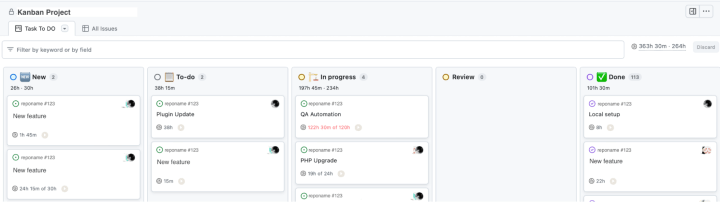
Sample Kanban Board
What kind of meetings occur during the project lifecycle?
Having set meetings that follow a specific structure to keep things moving smoothly. Below are the standard meetings conducted daily, weekly and monthly throughout the duration of the project. Do note these specific meetings may vary based on project needs.
1. Daily
- Standup – a daily sync (can be async) covering what was done the day before, what is being done today and any impediments (note: rtCamp uses a hybrid model for this, utilizing a slack workflow for daily async standups and a 3 x 30 min weekly internal team sync to address topical items needing calls)
2. Weekly to Monthly
- Team Syncs – these may be combined with other meeting needs, such as Planning or Grooming, but Team syncs exist as a routine touchpoint between our team and yours, so we have a space to answer/ask questions, provide status updates and review completed and upcoming work.
- Planning – a per sprint/per development cycle meeting where the upcoming tasks are planned, estimated (if needed still), assigned and committed to.
- Backlog Grooming (optional) – a meeting dedicated to prioritizing the backlog, reviewing the higher priority tickets and ensuring they are fully defined and there are no open questions/clarifications within them.
- Demo – a demo of sorts at the completion of each sprint or development cycle, reviewing the work that was done.
- Retrospective – done either on a sprint x sprint basis, or at a set routine outside the sprint cadence that allows the team (internally and optional externally) to review what is working, what is not working, and action on improvements.
How do we communicate?
There are a few tools we utilize to maintain constant and transparent communication/alignment. Of course, if there are specific tools you utilize for communication, we are happy to integrate into those as well/alternatively.
- GitHub Project Board – we utilize GitHub Project Boards as our default Project Management System. This tool integrates well with our GitHub repos, and allows us to granularly track tickets throughout the project
- Slack – Slack keeps our team connected and organized. It’s our virtual workspace for instant messaging, file sharing, and team updates.
- Email – email remains our formal space for any major project updates/changes.
What type of project reporting can be expected?
We want you to be informed every step of the way. One of the ways we facilitate this is through routine reporting. At any given time during a project you will be able to access the Project Management System and see all the various tickets and work being done. However, on a routine cadence (e.g. weekly, fortnightly, monthly depending on project type), you can expect a detailed report accounting what has been completed, what is being worked on, and what is coming next.
Our reports also highlight overall project status, blockers/risks and any noteworthy topics, keeping all the details you need in one, easy to read, place.
For our hour-based projects, in addition to this routine reporting, you can also expect a monthly time report, outlining in detail all the hours consumed throughout the prior month, and in some instances the time reports are sent as frequently as weekly.
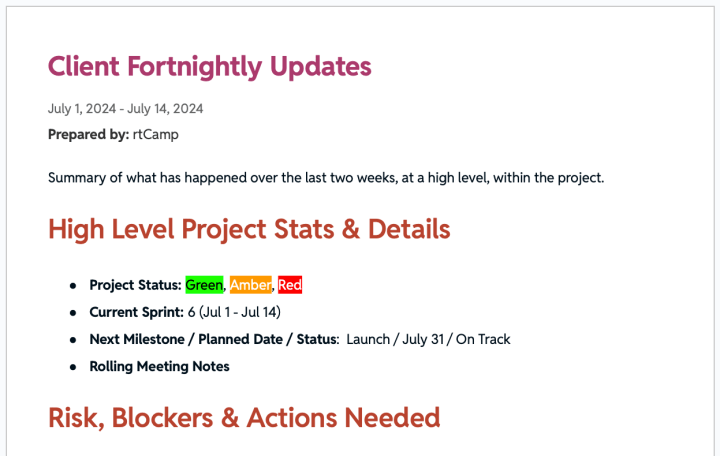
Fortnightly/Monthly Report

Sample Hour Report
What happens if something needs to be escalated?
While we aim to identify any risks, challenges and potential escalations up front, and mitigate them, time-to-time escalations do arise. An escalation is a situation when things are not working out or happening as expected, which if ignored, are likely to affect the healthy outcome of the project. At rtCamp we handle all escalations, regardless of whether they are large or small, promptly and with the most serious attention.
Examples of possible escalation include, but are not limited to:
- There was an unplanned delay in delivery of task/milestone
- The team was not available at and agreed time period
- The quality or details or what was delivered was not as expected
When an escalation arises, we have a formal process in place to guarantee immediate mitigation occurs. We utilize an escalation matrix to create clarity on role/ownership which can be seen below:
LevelDesignationDescription0Project ManagerFor day-to-day escalations, the Project Manager is the appropriate contact to raise, and address, these concerns.1Director of Client DeliveryIf there is no action from the Project Manager, or they are unable to address the issue alone/with the team, then it will be further escalated to our Directors in Delivery.2Client Account Manager
Depending on the severity of the escalation, and the areas of the engagement it impacts, the Client Account Managers will be looped in for visibility, and follow-ups in further communications
3Delivery Head
For our most complex and serious escalations, our Level 3 support comes from our Head of Delivery, who can further support the Director(s) and PM(s).
Ultimately, we run our projects, escalations included, as transparently as possible. If things arise that need more support than just the initial project team, you will be kept in the loop throughout the escalation remediation action.
How is scope creep handled?
It’s common for new requirements or information to emerge during a project that can impact scope or effort. In such cases, our project manager will communicate these changes transparently, outline their effect on cost and timelines, and we’ll decide the next steps together.
How does testing happen?
We have an in-house QA Engineering team, with QA support assigned to each project. Each developed solution, or feature, is thoroughly tested on the latest versions of major browsers and within popular mobile resolutions. If there is an existing site data about the browsers and mobile resolutions is collected from the Analytics platform and testing is performed accordingly.
Development is tested on the latest version of major browsers on desktop as well as mobile devices as in the below table:
Browser Operating SystemGoogle ChromeSafariMozilla FirefoxMicrosoft EdgeDesktop – macOS Sequoia, Version 15YesYesYesNoDesktop – Windows 11YesNoYesYesMobile – iOS 17YesYesYesNoMobile – Android 14 YesNo Yes No
If the project is geared towards launching the first version of a website, we will convey which standard browsers and mobile resolutions will be considered, and define these up front with you ahead of QA taking place.
To perform cross browser testing we use Browser Stack service. This allows testing the websites in different browsers on different platforms and mobile devices.
If any issues are found by the QAE, they are reported in our Project Management System, where they are then addressed by the Engineering team. A final round of testing is performed by the QAE before handing over the website to Client UAT.
While we do aim to catch as many bugs as possible ahead of UAT, and Launch, testing is geared at identifying common issues. Therefore, not all nuanced issues may be captured during QA, which is why a thorough UAT is critical ahead of launching.
What does launching look like?
To avoid exposing unnecessary risk, we always recommend launching Monday through Thursday, and during the time when there is the least traffic on the website. Well-defined operating processes are shared ahead of time outlining pre-launch, launch and post-launch activities and explorations. Our launch documentation specially highlights who is responsible for each action, and when. This ensures alignment of all involved parties on what, and when, everything is happening.
Such operating processes look like:
1. Pre-launch
- Decide the date and time for the launch
- Do the code and content freeze 3 days prior to the launch date
- Have a launch checklist in place
- Do the URL search-replace
- Verify the site once again by making an entry in the local machine’s hosts file
- Communicate any DNS switching details to the Client so that they can convey the same to respective stakeholders within their team
- Inform about reducing the TTL to the lowest possible value to ensure least to no downtime during DNS switch
- Setup a “Pre-launch sync” meeting with project stakeholders for a day prior to the launch day
- Setup a live bridge (“Launch” meeting) with necessary stakeholders for the launch day
2. During launch
- Check the live traffic on the website through Analytics platform
- If there is least or no traffic, then request the Client’s team to switch the DNS
- Ensure the SSL certificate is installed and configured
- Open the site for SEO from “Settings > General” screen on WordPress dashboard
- Verify the /robots.txt has correct rules and sitemap.xml is present
- Check top level pages and test form submissions
3. Post launch
- QAE to review the entire site, form submissions and email delivery
- Standard WordPress tests e.g. Add/edit/delete of post/page/taxonomy/media/user
- Ensure there are no warnings/errors in the browser console, e.g. all URLs are https and there are no mixed content warnings
- Connect Jetpack, GTM, Analytics, etc.
- Verify the traffic is being captured in the Analytics
What happens after launch?
Once a project is live on production, we shift into a hypercare window (offered to all Clients) for a stipulated time period. Anything included in the agreed scope that is either missed or not implemented correctly will be fixed during the agreed hypercare period at no additional cost.
If something surfaces later that was part of the original scope, we’ll still take responsibility and address it. We take pride in delivering quality work and standing by every commitment we make, both in spirit and in contract.
After the support window is over, all Clients are offered a Managed Services contract where rtCamp can continue support for additional/ongoing enhancements or new feature development work.
Separate to support, with your permissions we prepare a draft case study, and put you in contact with our Marketing team who will likely seek a testimonial. The final draft of the case study is shared with you for review and approval before publishing on our website.
How do invoices get sent?
You will find all payment terms within the Statement of Work, so expectations are set up front on when payment will be due. Depending on the project type, we operate under different payment terms. Some of the most commonly used at rtCamp are:
- Milestone based invoicing: this payment method is used for Fixed Price projects, issuing an invoice after each agreed upon milestone is complete.
- Monthly invoicing: this payment method is used primarily for Staff Augmentation and Time & Material projects. A monthly invoice will be sent based on the hours consumed by the team for the month in arrears. Invoices are generated monthly based on the hours invested by the engineers.
- Pay as you go: we utilize this payment method for most of our retainer engagements. Blocks of hours are purchased, and paid for, and the team then works against those purchased hours over an agreed upon timeframe.
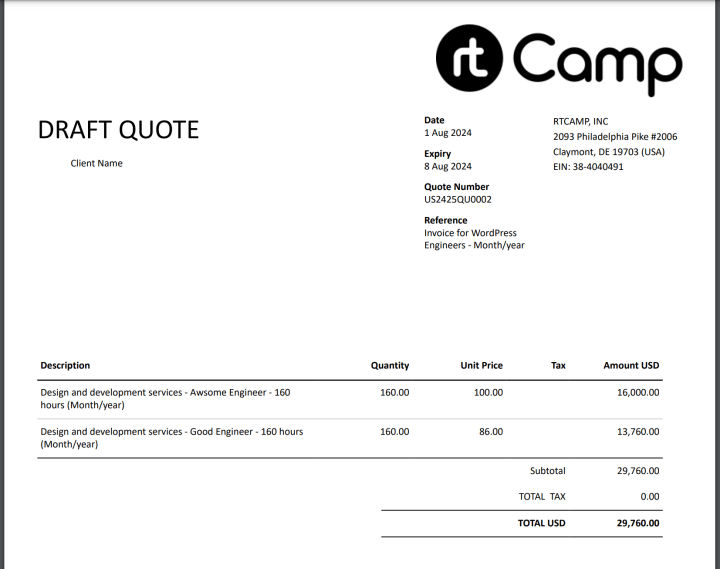
Sample Invoice
When we begin work together
PREVIOUS
Credits

Mackenzie Hartung
Author
Mackenzie Hartung
Author
Mackenzie Hartung is the Chief Delivery Officer at rtCamp, where she oversees the delivery strategy, processes, and teams that power enterprise WordPress engagements. With over a decade of experien…

Good Work. Good People.
Industry partnerships


Compliance certifications


 United States India
© rtCamp Inc. since 2009. All rights reserved.
Terms of Service · Privacy Policy · Trust Center
Company
Solutions
Subscribe to Campfire for fresh insights and stories from people behind rtCamp
Δ
Email(Required)
Submit
United States India
© rtCamp Inc. since 2009. All rights reserved.
Terms of Service · Privacy Policy · Trust Center
Cookie Consent
We value your privacy
We use cookies to give you the best possible experience. By clicking “Accept,” you consent to our use of cookies to improve site functionality, analyze usage, and personalize content and communications. Your privacy matters to us, and we are committed to handling your data responsibly and transparently. Please check our Privacy Policy for more details.
Manage PreferencesDon’t AllowAllow All
Why do we use cookies?
×
By clicking "Accept" or "Decline All" at the bottom, you consent to the use of cookies and other tools as described in our Cookie Policy in accordance with your settings and accept our Terms of Service.
Toggle EssentialEssential
Essential cookies enable basic functions and are necessary for the proper function of the website.
Name
Description
Duration
Geolocation Config
This cookie is used to store the consent settings based on the visitor's location.
30 days
Cookie Preferences
This cookie is used to store the user's cookie consent preferences.
30 days
Toggle CloudFlareCloudFlare
CloudFlare provides web performance and security solutions, enhancing site speed and protecting against threats.
Service URL: developers.cloudflare.com (opens in a new window)
Name
Description
Duration
cf_clearance
Whether a CAPTCHA or Javascript challenge has been solved.
session
Toggle CommentsComments
These cookies are needed for adding comments on this website.
Name
Description
Duration
comment_author
Used to track the user across multiple sessions.
Session
comment_author_email
Used to track the user across multiple sessions.
Session
comment_author_url
Used to track the user across multiple sessions.
Session
Toggle GodamGodam
GoDAM" is primarily a specialized WordPress plugin and media management service designed to enhance video hosting, marketing, and asset management directly within the WordPress dashboard.
Service URL: godam.io (opens in a new window)
Name
Description
Duration
user_image
Temporarily stores the path to the user's avatar or profile picture for quick rendering in the website header.
session
user_id
Stores the numerical ID of the logged-in user to maintain session continuity and basic site operations.
session
full_name
Stores the logged-in user's display name to personalize the site interface without needing database queries.
session
system_user
First-party cookie used to store basic application state identifying the current system user role.
session
sid
A generic session ID cookie used to maintain user state and functionality as the visitor navigates through the site.
session
Toggle Google reCAPTCHAGoogle reCAPTCHA
Google reCAPTCHA helps protect websites from spam and abuse by verifying user interactions through challenges.
Name
Description
Duration
_GRECAPTCHA
Google reCAPTCHA sets a necessary cookie (_GRECAPTCHA) when executed for the purpose of providing its risk analysis.
179 days
Toggle Google Tag ManagerGoogle Tag Manager
Google Tag Manager simplifies the management of marketing tags on your website without code changes.
Name
Description
Duration
cookiePreferences
Registers cookie preferences of a user
2 years
td
Registers statistical data on users' behaviour on the website. Used for internal analytics by the website operator.
session
Toggle StatisticsStatistics
Statistics cookies collect information anonymously. This information helps us understand how visitors use our website.
Toggle Factors AIFactors AI
Factors.ai is a B2B account intelligence and marketing analytics platform that helps Go-To-Market (GTM) teams identify anonymous website visitors, track buyer journeys, and measure the ROI of marketing campaigns.
Service URL: www.factors.ai (opens in a new window)
Name
Description
Duration
_fuid
It is sent to capture session details and track user behavior across your website to provide behavioral data and intent signals.
1 Year
Toggle Google AnalyticsGoogle Analytics
Google Analytics is a powerful tool that tracks and analyzes website traffic for informed marketing decisions.
Service URL: policies.google.com (opens in a new window)
Name
Description
Duration
FPGSID
Stores a session or user identifier to track how visitors interact with a website. This helps Google Analytics measure website performance, user engagement, and usage patterns.
Session
FPLC
Used by Google Analytics to link visitor interactions and sessions across multiple related domains.
20 hours
FPID
A server-side Google Analytics cookie used as an alternative user identifier when third-party cookies are restricted.
2 years
_ga
ID used to identify users
2 years
_ga_
ID used to identify users
2 years
Toggle Jetpack StatsJetpack Stats
Jetpack's built-in visitor analytics. It records page views, referring sites, search terms, and outbound link clicks, and also carries the shared visitor-tracking library used by Jetpack Instant Search and WooCommerce Analytics.
Service URL: automattic.com (opens in a new window)
Name
Description
Duration
tk_aip
Stores a list of anonymous visitor IDs so they can be merged into one identity once a visitor is recognized.
Up to 5 years
tk_tc
Used once per page load to work out which cookie domain the Tracks library should use, then removed as soon as it's read back.
Session (deleted immediately after use)
tk_qs
Queues analytics events for Jetpack's Tracks library so none are lost if the page closes before they can be sent.
30 minutes
tk_ai
Stores a randomly-generated anonymous visitor ID so Jetpack's Tracks analytics library can link tracking events to the same visitor.
Session in wp-admin; up to 5 years on the frontend
Toggle Microsoft ClarityMicrosoft Clarity
Clarity is a web analytics service that tracks and reports website traffic.
Service URL: clarity.microsoft.com (opens in a new window)
Name
Description
Duration
CLID
Identifies the first-time Clarity saw this user on any site using Clarity.
12 months
ANONCHK
Indicates whether MUID is transferred to ANID, a cookie used for advertising. Clarity doesn't use ANID and so this is always set to 0.
Session
_clck
Persists the Clarity User ID and preferences, unique to that site is attributed to the same user ID.
12 months
_clsk
Connects multiple page views by a user into a single Clarity session recording.
12 months
Toggle Parse.lyParse.ly
Parse.ly is a content analytics platform that helps publishers optimize audience engagement and content performance.
Name
Description
Duration
_parsely_session
JSON document storing information identifying a browsing session according to Parsely’s proprietary definition
30 minutes
_parsely_visitor
JSON document uniquely identifying a browser and counting its sessions
13 months
cookies.js_dtest
This cookie determines whether the browser accepts cookies.
session
Toggle MarketingMarketing
Marketing cookies are used to follow visitors to websites. The intention is to show ads that are relevant and engaging to the individual user.
Toggle Bing / MicrosoftBing / Microsoft
Bing, powered by Microsoft, is a search engine providing web, image, video, and map search capabilities.
Name
Description
Duration
MR
Used to collect information for analytics purposes.
6 months
ANONCHK
Used to store session ID for a users session to ensure that clicks from adverts on the Bing search engine are verified for reporting purposes and for personalisation
10 minutes
SM
Used by Microsoft in synchronizing the MUID across multiple Microsoft domains to track users for advertising.
session
MUID
Identifies unique web browsers visiting Microsoft sites. These cookies are used for advertising, site analytics, and other operational purposes.
1 year
Toggle DoubleClick/Google MarketingDoubleClick/Google Marketing
A comprehensive digital advertising platform for managing campaigns, optimizing performance, and analyzing audience data.
Name
Description
Duration
IDE
This cookie is used for targeting, analyzing and optimisation of ad campaigns in DoubleClick/Google Marketing Suite
2 years
ar_debug
Store and track conversions
Persistent
Toggle LinkedInLinkedIn
LinkedIn is a professional networking platform for job seekers, employers, and industry connections.
Name
Description
Duration
bscookie
Used by LinkedIn to track the use of embedded services.
1 year
AnalyticsSyncHistory
Used to store information about the time a sync with the lms_analytics cookie took place for users in the Designated Countries
30 days
bcookie
Used by LinkedIn to track the use of embedded services.
1 year
li_sugr
Used to make a probabilistic match of a user's identity outside the Designated Countries
90 days
lidc
Used by the social networking service, LinkedIn, for tracking the use of embedded services.
1 day
UserMatchHistory
Used by LinkedIn Ads to synchronize and match user IDs across different ad networks and data providers.
30 days
Toggle LinkedIn InsightLinkedIn Insight
LinkedIn Insight is a web analytics service that tracks and reports website traffic.
Service URL: www.linkedin.com (opens in a new window)
Name
Description
Duration
li_sugr
Used to make a probabilistic match of a user's identity.
90 days
lidc
Used for routing and session management.
24 hours
Toggle LiveIntentLiveIntent
LiveIntent provides a platform for email advertising and identity-driven marketing solutions.
Name
Description
Duration
_lc2_fpi_js
Companion cookie to _lc2_fpi used by JavaScript to facilitate cross-domain ad tracking and user identification.
1 year
_lc2_fpi
First-party tracking cookie usually associated with LiveRamp to identify users across devices for targeted advertising.
1 Year
_li_ss
Sets a unique ID for the visitor, that allows third party advertisers to target the visitor with relevant advertisement. This pairing service is provided by third party advertisement hubs, which facilitates real-time bidding for advertisers.
1 month
lidid
Collects data on visitors' behaviour and interaction - This is used to make advertisement on the website more relevant. The cookie also allows the website to detect any referrals from other websites.
2 years
Toggle Cookie PolicyCookie Policy
You can find more information in our Privacy Policy.
Allow AllDecline All
Accept