/handbook/drupal-to-wordpress-migration-guide/business-case/
What We Do
Digital Platform MigrationsKey SolutionsManaged ServicesStaffing SolutionsIndustriesProducts


Discovery
Strategic consultancy & project roadmap

Growth Services
On demand development & consultation

Site Maintenance
Annual maintenance. Done for you

QE Services
Testing across SDLC for assured quality

Hosting Migration
Move to a performant hosting with zero downtime

WooCommerce
Enterprise commerce delivered without lock-in

AI
Unlock real use cases and integrations

All Services
A suite of services for any need
Technology STACK


eCommerce
Scale your e-commerce with WooCommerce, integrations, and custom extensions for growth.


EasyEngine
Server management tool that makes using WordPress on Nginx easy.

Web Auditor
Performance Audit & Insights for your Website.

rtMedia
A complete media management plugin for WordPress.
Resources


About Us


CLEAR
 Resources How Enterprises Migrate from Drupal to WordPress Business case for migration
Topics
On this page
- How Enterprises Migrate from Drupal to WordPress
- Business case for migration
- Migration process, timeline & team
- Planning the migration
- Frontend migration
- Content migration
- Backend migration
- Quality assurance
- Site launch
- How can rtCamp help
Drupal requires “Drupal specialization;” WordPress keeps things simple and intuitive
Drupal’s updates and maintenance are challenging; WordPress keeps things simple
Drupal boxes content teams; WordPress empowers editorial autonomy
Enterprise hosting providers: The Acquia lock-in problem and WordPress' flexibility
Proprietary tools and custom APIs
High cost for hosting and support
Complex development workflows
No vendor lock-in: Freedom to choose hosting
More affordable enterprise hosting options
Flexible DevOps and CI/CD workflows
Security layers and configuration: Drupal’s complexity vs. WordPress’ streamlined approach
Multiple security modules for essential features
Advanced logging and monitoring requires external tools
Custom security policies for compliance (GDPR, HIPAA, etc.)
Server-level security: Drupal vs WordPress
Roles and permissions in security: Drupal vs. WordPress
Content modularity in Drupal vs WordPress: Complexity vs flexibility
Multisite management: Only WordPress delivers true centralization
Why moving from Drupal to WordPress makes sense for enterprises
Last updated on May 28, 2026
Drupal to WordPress migration: The business case
Ask anyone for a Drupal vs WordPress take, and the default response will likely be: “Drupal is for complex enterprise projects where you need granular control over everything, while WordPress is for simple websites.”
This perception is deeply ingrained—almost an industry status quo.
But does it hold up today?
Not really.
Today, WordPress empowers you to do everything that Drupal does—but in a simpler and more maintainable way. It supports complex content modeling, offers enterprise-grade security, and is highly performant, making it a great Drupal alternative for large-scale digital experiences.
Many enterprises are switching from Drupal to WordPress because it offers lower maintenance, reduced total cost of ownership, and superior content management. In this handbook, we’ll show you exactly how to make that migration smoothly.
But first, let’s explore the key challenges with Drupal and understand why more organizations are making the switch—insights drawn from countless RFPs, inquiries, and our migration consultations.
Drupal requires “Drupal specialization;” WordPress keeps things simple and intuitive
You’d expect Drupal and WordPress to work quite similarly, given their shared roots in PHP. But that’s not quite the case. Drupal has its own way of doing things—from how you design the frontend to how you extend functionality in the backend.
Take theming, for example. Drupal relies on Twig, a templating engine that adds structure but also complexity. WordPress, in contrast, keeps things straightforward with PHP-based templating and now block-based themes and full-site editing.
Backend development also follows this—working with services, hooks, and YAML configurations needs Drupal expertise.
Drupal’s way of doing things translates to “Drupal specialization,” making Drupal developers harder to find and often more expensive. WordPress, with its larger talent pool, makes hiring easier and scaling a team more practical.
WordPress, in contrast, keeps things simple and intuitive.
WordPress’s templating system is PHP-based, with themes that are easy to modify. WordPress has also evolved with a block-based editor and full-site editing capabilities, enabling developers and content creators to work within a more streamlined framework.
Backend customization is just as straightforward, relying on action and filter hooks that are more approachable than Drupal’s services and YAML.
With its larger talent pool, WordPress makes hiring easier, more cost-effective, and scalable—helping teams grow without the technical limitations of Drupal. It’s also easier to upskill a development team in WordPress.
These things have a direct bearing on everything from your developer experience to TCO and maintenance.
Drupal’s updates and maintenance are challenging; WordPress keeps things simple
Drupal’s core architecture is built around modularity, a design philosophy that encourages the use of distinct modules to extend and customize the system. While this modular approach provides granular flexibility, it makes maintenance and updates challenging.
Each module in Drupal is essentially a separate entity that may depend on others. Managing these dependencies can quickly become complex, especially when custom modules are added. The more dependencies a Drupal site has, the more difficult it is to maintain.
Also, because the core structure of the platform and many modules are tightly interwoven, upgrading to a newer version often requires significant rework.
And even in general, updates in Drupal typically involve large, disruptive migrations that can be time-consuming and costly, often requiring a complete replatforming. Backward compatibility, too, has never been the platform’s strength.
Let’s talk about WordPress now.
While WordPress also embraces a modular approach through plugins, its ecosystem is built for ease of use. Plugins are designed to function independently or with minimal dependencies, reducing maintenance issues.
Unlike Drupal, which often requires full-scale replatforming to transition between major versions—resulting in higher costs and development effort—WordPress follows an incremental update model. This ensures that updates are applied smoothly without disrupting existing functionality. WordPress also allows one-click updates for core, themes, and plugins.
Also, one of WordPress’s greatest strengths is its commitment to backward compatibility. Unlike Drupal, where major version upgrades often force enterprises into costly, time-intensive replatforming, WordPress ensures that updates—whether minor or major—are streamlined, non-disruptive, and rarely require redevelopment.
A site built on WordPress today will remain functional and compatible years down the line.
Drupal boxes content teams; WordPress empowers editorial autonomy
Drupal’s editorial experience has long relied on CKEditor, a traditional WYSIWYG editor that, while functional, feels outdated.
With Drupal, content teams often find themselves working within rigid text fields , manually formatting content, and navigating complex workflows just to create and manage pages.
While Drupal’s structured content model is powerful, it often comes at the cost of flexibility. Editors must work within predefined content types and fields, limiting their ability to create rich, dynamic layouts unless IT teams step in to configure new setups. Want to add a new page structure? That likely means waiting for development resources.
Additionally, Drupal’s interface lacks true inline editing, forcing editors to work in backend forms instead of seeing changes in real time. While the Quick Edit module provides some basic inline text editing, it’s still limiting. Paragraphs & Layout Builder help too but only so much. This often results in trial-and-error publishing, where multiple previews are required before content appears correctly on the front end.
WordPress, in contrast, revolutionizes content creation with Gutenberg, its block-based editor that gives content teams full control over layout, design, and structure—without developer intervention.
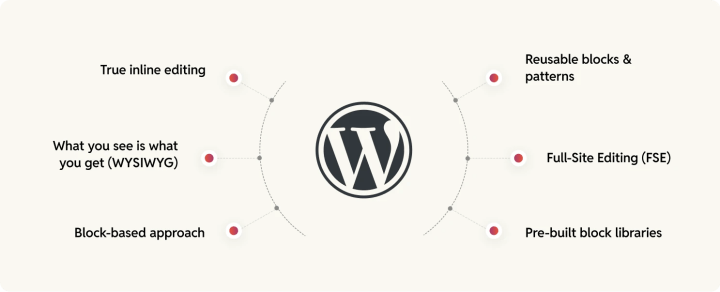
- True inline editing: Editors can modify content directly on the page and instantly see how it will look upon publishing.
- What you see is what you get (WYSIWYG)—no need to switch between preview modes or rely on backend input fields.
- Block-based approach: Everything—text, images, embeds, buttons, and layouts—is a block, allowing for true drag-and-drop visual editing without relying on hard-coded templates.
- Reusable blocks and patterns: Teams can create standardized content sections that can be quickly applied across multiple pages, ensuring consistency and accelerating production workflows.
- Full-Site Editing (FSE) extends Gutenberg’s flexibility beyond posts and pages to headers, footers, and templates, allowing non-technical teams to manage the entire site layout (quite unlike how it’s done with Drupal’s cumbersome block placement and region-based layout system).
- Pre-built block libraries: Instead of waiting for developers to create custom modules, teams can leverage dozens of pre-designed Gutenberg blocks for designing content-rich experiences. These blocks often come with built-in styles that match modern design trends. Styling can be easily customized through the WordPress Customizer or by adding custom CSS, giving teams the flexibility to adjust fonts, colors, margins, and more to align with their brand identity.
Enterprise hosting providers: The Acquia lock-in problem and WordPress’ flexibility
When it comes to enterprise-grade hosting for Drupal, Acquia is positioned as the go-to managed hosting solution for large-scale Drupal deployments, offering infrastructure, security, and performance enhancements tailored specifically for Drupal sites.
While Acquia provides a well-optimized environment for Drupal, it also introduces a proprietary layer on top of the open-source CMS. This means that once you commit to Acquia, you’re locked into its ecosystem, making it significantly harder to migrate away without extensive re-engineering.
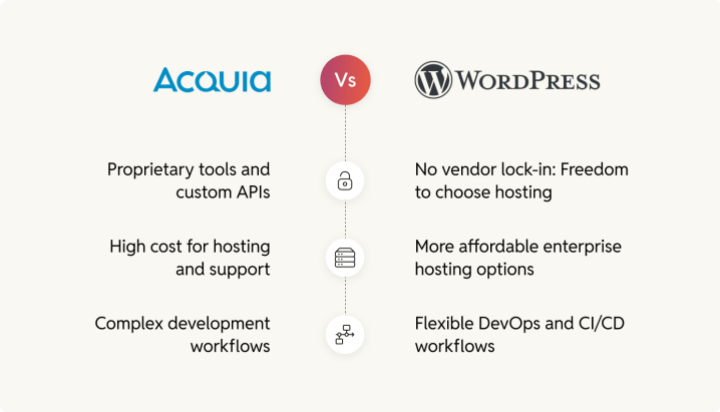
Let’s zoom in on the challenges of Acquia lock-in.
Proprietary tools and custom APIs
Acquia offers features like Acquia Cloud Platform, Acquia Site Factory, and Acquia Personalization, which are deeply integrated with Drupal.
While these tools enhance Drupal’s capabilities, they also create vendor lock-in because they aren’t easily replicated on standard cloud platforms.
For example, Acquia’s Lift personalization engine is a proprietary service for audience segmentation and content targeting. If you build your content strategy around Lift, migrating to another provider means losing these capabilities and having to rebuild personalization from scratch.
High cost for hosting and support
Acquia is significantly more expensive than many managed WordPress hosting providers. Their enterprise hosting plans often include a mix of infrastructure, support, and premium services, but at a steep price.
Acquia’s pricing structure can be prohibitive, particularly for companies looking to optimize costs while maintaining high performance, compared to alternatives for WordPress.
Also, Acquia’s custom DevOps workflows, deployment processes, and security configurations are designed specifically for its own hosting environment, making them harder to replicate elsewhere. If you decide to move off Acquia, you may need to rearchitect your hosting and deployment strategy, which will be a massive project in itself.
Complex development workflows
Acquia enforces a specific Git-based deployment workflow, which can feel restrictive compared to the GitHub Actions, Bitbucket Pipelines, or CI/CD tools that many development teams are used to.
The Acquia Cloud CD (Continuous Delivery) system is designed specifically for Drupal, making it difficult to align with broader enterprise DevOps workflows.
Acquia’s custom DevOps workflows, deployment processes, and security configurations are designed specifically for its own hosting environment, making them harder to replicate elsewhere.
WordPress, by contrast, gives enterprises the freedom to choose from a broad ecosystem of hosting providers, DevOps tools, and infrastructure setups.
No vendor lock-in: Freedom to choose hosting
Unlike Acquia, WordPress doesn’t require enterprises to rely on a single vendor. WordPress can be hosted with a host of enterprise hosting providers like WPVIP, Pagely, or Pantheon (just to name a few).
Also, because WordPress doesn’t impose a proprietary layer even with its own enterprise hosting solution (WPVIP), businesses can easily move their site between hosting providers without major redevelopment work.
More affordable enterprise hosting options
WordPress has a competitive hosting landscape, with multiple vendors offering enterprise-grade performance at lower costs compared to Acquia. With multiple options available, businesses can choose a provider that aligns with their budget and technical requirements.
Flexible DevOps and CI/CD workflows
WordPress doesn’t enforce a specific deployment workflow like Acquia’s Git-based system. Enterprises can integrate WordPress with their preferred CI/CD pipelines. This allows WordPress to fit seamlessly into modern enterprise DevOps practices without forcing teams to conform to a proprietary workflow.
Additionally, many managed WordPress hosting providers offer enterprise-grade security and performance optimizations without the complexity of Acquia’s proprietary solutions with features like:
- Built-in DDoS protection, Web Application Firewalls (WAFs), and malware scanning
- Global CDN integration for speed optimization
- Edge caching for high-traffic scalability
Security layers and configuration: Drupal’s complexity vs. WordPress’ streamlined approach
Securing a Drupal infrastructure involves configuring multiple security layers manually. In other words, Drupal gives you security as a framework, but you have to do most of the work yourself to ensure it’s properly implemented.
Multiple security modules for essential features
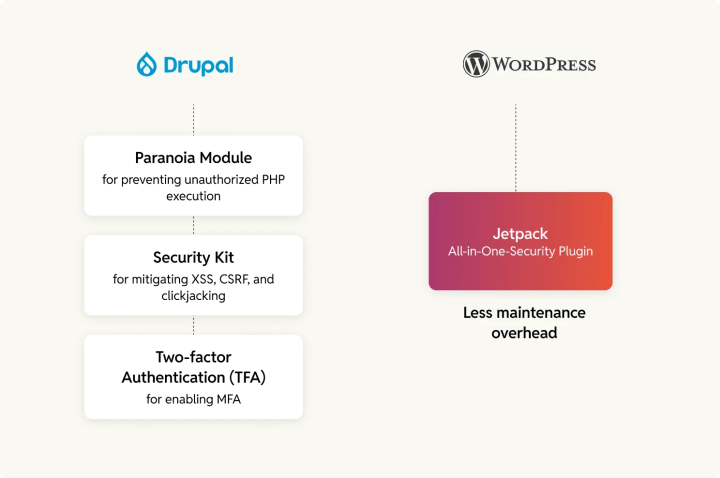
Drupal requires multiple contributed modules for fundamental security features.
Examples include:
- Security Kit for mitigating XSS, CSRF, and clickjacking
- Paranoia Module for preventing unauthorized PHP execution
- Two-factor Authentication (TFA) for enabling MFA
Keeping these modules updated adds to maintenance overhead since each has its own release cycle and potential compatibility issues.
WordPress addresses these fundamental security needs through integrated, all-in-one security plugins that bundle multiple features into one solution—significantly reducing maintenance overhead. Take Jetpack, for example.
Advanced logging and monitoring requires external tools
Drupal lacks a built-in security dashboard for monitoring threats. Enterprises need to integrate:
- ELK Stack (Elasticsearch, Logstash, Kibana)
- New Relic or Datadog for performance and security monitoring
- Custom Syslog configurations
To use ELK Stack, Syslog, or New Relic with Drupal, you need to install and configure contrib modules. This increases complexity and reliance on third-party services. While Acquia offers enterprise-grade monitoring, its fullstack integration requires custom development and external infrastructure.
Even with WordPress, you need to bring such monitoring through plugins, but you’ve enterprise-level all-in-one solutions in the form of plugins with WordPress. Besides, if you’re using an enterprise-grade hosting, you get built-in monitoring as well (depending on the hosting you use).
Custom security policies for compliance (GDPR, HIPAA, etc.)
Drupal does not natively include compliance tools, requiring:
- Custom policies for data retention & encryption
- Custom cookie consent mechanisms
- Enterprise-grade audit logging
It’s not like WordPress offers these built-in but you get a head start with its compliance-focused plugin solutions and built-in privacy controls.
Server-level security: Drupal vs WordPress
When it comes to server security, neither Drupal nor WordPress includes hardened server-level protection by default. The level of security depends largely on how the platform is hosted—whether it’s self-hosted or managed by a provider like Acquia for Drupal or WordPress VIP for WordPress.
If you’re running a self-hosted site on Drupal or WordPress, security is entirely your responsibility. Neither platform includes built-in protections against server-level threats like DDoS attacks, brute-force attempts, or malware injections. You must configure security manually or rely on third-party services.
Acquia, Drupal’s managed hosting solution, provides infrastructure security but leaves a lot of configuration in the hands of the development team. While Acquia offers security features, they are not enforced by default and require manual tuning.
WordPress VIP, on the other hand, enforces strict security policies across all sites. Unlike Acquia, which provides security options that need manual configuration, VIP automates security best practices by default.
Roles and permissions in security: Drupal vs. WordPress
Drupal has a highly flexible, granular permissions system built into its core, allowing enterprises to fine-tune access control down to individual fields and actions.
However, in enterprise settings, achieving full control often requires additional modules, adding layers of complexity.
While this extreme granularity is powerful, it also demands meticulous configuration and ongoing management—misconfigured permissions can introduce security gaps, and keeping everything aligned typically requires dedicated oversight.
WordPress, by contrast, offers a simpler, more streamlined approach that prioritizes usability while still delivering enterprise-grade security.
Its core role system is easier to manage, and with role and access management plugins or managed services like WordPress VIP, enterprises can achieve the same level of security and access control as Drupal—without the excessive configuration burden.
In fact, managed WordPress solutions (such as WordPress VIP) provide SSO, OAuth, and Active Directory integration, making enterprise authentication seamless and scalable.
Content modularity in Drupal vs WordPress: Complexity vs flexibility
One of Drupal’s standout features is its content modeling capabilities. The platform’s modular architecture allows developers to create custom content types, fields, and relationships with highly granular control over data structure and presentation
However, this flexibility comes with a cost. Drupal’s content modeling is powerful but complex, often requiring specialized development expertise to set up and maintain. Creating custom content types, managing relationships, and adjusting configurations can be time-consuming and requires knowledge of both Drupal’s built-in tools (such as the Content Types and Views modules) and third-party modules for extended functionalities.
Additionally, once the content architecture is built, ongoing maintenance and scalability can become cumbersome. Enterprises often need a dedicated team to ensure that content types, fields, and configurations remain aligned with business requirements and that performance is optimized.
On the other hand, WordPress takes a more intuitive approach to content management and modularity, designed to simplify the process while maintaining a high degree of flexibility. WordPress’s content modeling starts with posts and pages, which can be further customized through custom post types and custom fields. For most use cases, custom post types allow WordPress users to create distinct content structures (like portfolios, events, or products) with relative ease.
WordPress also supports content relationships through plugins such as Advanced Custom Fields (ACF) and Pods, enabling users to define complex content models. While this offers a simpler and more user-friendly interface than Drupal, it still offers substantial flexibility for more advanced content structuring.
With plugins like ACF and Pods, content creators can easily extend and modify the content model without relying on custom development. The interface is intuitive, making it easier for teams to create and update content structures without a steep learning curve.
Multisite management: Only WordPress delivers true centralization
WordPress Multisite lets you manage all your sites under one roof—whether for franchises, global brands, or internal networks. With a centralized dashboard, you get network-wide control, making it easy to oversee updates, plugins, and themes across multiple sites. You can also extend WordPress Multisite to enable deeper integrations—sharing everything from users to design systems and DevOps pipelines for a more streamlined workflow.
Drupal Multisite takes a different approach. It runs multiple sites from a shared codebase but maintains separate databases, ensuring stronger data isolation. This setup can be useful when sites need to operate independently while leveraging some shared infrastructure. However, it comes with trade-offs: higher maintenance overhead, complex updates, and no true centralized management, making it less efficient for large-scale multisite networks.
For enterprises managing multiple digital properties, multisite management is also a reason for migrating to WordPress. We’ve covered this topic extensively in our Drupal vs WordPress handbook—check it out for a deeper comparison.
Why moving from Drupal to WordPress makes sense for enterprises
Moving from Drupal to WordPress offers a compelling business case for enterprises looking for a simpler and more intuitive approach to development, content management, and security.
WordPress allows for innovation instead of dealing with complex configurations and expensive updates. Many organizations, in fact, migrate Drupal to WordPress for this very reason.
With a lower total cost of ownership, access to a broader talent pool, and a wider selection of hosting options, WordPress stands out as the ideal alternative for enterprises seeking scalability without getting caught up in the intricacies of Drupal.
How Enterprises Migrate from Drupal to WordPress
PREVIOUS
Migration process, timeline & team
NEXT
Credits

Disha Sharma
Author
Disha Sharma
Author
Disha Sharma is a Content Writer at rtCamp with over a decade of experience at the intersection of technology, digital marketing, and enterprise content strategy. Her WordPress roots run deep, her …

Aviral Mittal
Editor
Aviral Mittal
Editor
Aviral Mittal is the Chief Marketing Officer at rtCamp, where he established and leads the marketing function, building and growing a team of 20+ specialists across content, SEO, design, and growth…

Good Work. Good People.
Industry partnerships


Compliance certifications


 United States India
© rtCamp Inc. since 2009. All rights reserved.
Terms of Service · Privacy Policy · Trust Center
Company
Solutions
Subscribe to our newsletter and get a few email updates every month.
United States India
© rtCamp Inc. since 2009. All rights reserved.
Terms of Service · Privacy Policy · Trust Center
Cookie Consent
We value your privacy
We use cookies to give you the best possible experience. By clicking “Accept,” you consent to our use of cookies to improve site functionality, analyze usage, and personalize content and communications. Your privacy matters to us, and we are committed to handling your data responsibly and transparently. Please check our Privacy Policy for more details.
Manage PreferencesDon’t AllowAllow All
Why do we use cookies?
×
By clicking "Accept" or "Decline All" at the bottom, you consent to the use of cookies and other tools as described in our Cookie Policy in accordance with your settings and accept our Terms of Service.
Toggle EssentialEssential
Essential cookies enable basic functions and are necessary for the proper function of the website.
Name
Description
Duration
Geolocation Config
This cookie is used to store the consent settings based on the visitor's location.
30 days
Cookie Preferences
This cookie is used to store the user's cookie consent preferences.
30 days
Toggle CloudFlareCloudFlare
CloudFlare provides web performance and security solutions, enhancing site speed and protecting against threats.
Service URL: developers.cloudflare.com (opens in a new window)
Name
Description
Duration
cf_clearance
Whether a CAPTCHA or Javascript challenge has been solved.
session
Toggle CommentsComments
These cookies are needed for adding comments on this website.
Name
Description
Duration
comment_author
Used to track the user across multiple sessions.
Session
comment_author_email
Used to track the user across multiple sessions.
Session
comment_author_url
Used to track the user across multiple sessions.
Session
Toggle GodamGodam
GoDAM" is primarily a specialized WordPress plugin and media management service designed to enhance video hosting, marketing, and asset management directly within the WordPress dashboard.
Service URL: godam.io (opens in a new window)
Name
Description
Duration
user_image
Temporarily stores the path to the user's avatar or profile picture for quick rendering in the website header.
session
user_id
Stores the numerical ID of the logged-in user to maintain session continuity and basic site operations.
session
full_name
Stores the logged-in user's display name to personalize the site interface without needing database queries.
session
system_user
First-party cookie used to store basic application state identifying the current system user role.
session
sid
A generic session ID cookie used to maintain user state and functionality as the visitor navigates through the site.
session
Toggle Google reCAPTCHAGoogle reCAPTCHA
Google reCAPTCHA helps protect websites from spam and abuse by verifying user interactions through challenges.
Name
Description
Duration
_GRECAPTCHA
Google reCAPTCHA sets a necessary cookie (_GRECAPTCHA) when executed for the purpose of providing its risk analysis.
179 days
Toggle Google Tag ManagerGoogle Tag Manager
Google Tag Manager simplifies the management of marketing tags on your website without code changes.
Name
Description
Duration
cookiePreferences
Registers cookie preferences of a user
2 years
td
Registers statistical data on users' behaviour on the website. Used for internal analytics by the website operator.
session
Toggle StatisticsStatistics
Statistics cookies collect information anonymously. This information helps us understand how visitors use our website.
Toggle Factors AIFactors AI
Factors.ai is a B2B account intelligence and marketing analytics platform that helps Go-To-Market (GTM) teams identify anonymous website visitors, track buyer journeys, and measure the ROI of marketing campaigns.
Service URL: www.factors.ai (opens in a new window)
Name
Description
Duration
_fuid
It is sent to capture session details and track user behavior across your website to provide behavioral data and intent signals.
1 Year
Toggle Google AnalyticsGoogle Analytics
Google Analytics is a powerful tool that tracks and analyzes website traffic for informed marketing decisions.
Service URL: policies.google.com (opens in a new window)
Name
Description
Duration
FPGSID
Stores a session or user identifier to track how visitors interact with a website. This helps Google Analytics measure website performance, user engagement, and usage patterns.
Session
FPLC
Used by Google Analytics to link visitor interactions and sessions across multiple related domains.
20 hours
FPID
A server-side Google Analytics cookie used as an alternative user identifier when third-party cookies are restricted.
2 years
_ga
ID used to identify users
2 years
_ga_
ID used to identify users
2 years
Toggle Jetpack StatsJetpack Stats
Jetpack's built-in visitor analytics. It records page views, referring sites, search terms, and outbound link clicks, and also carries the shared visitor-tracking library used by Jetpack Instant Search and WooCommerce Analytics.
Service URL: automattic.com (opens in a new window)
Name
Description
Duration
tk_aip
Stores a list of anonymous visitor IDs so they can be merged into one identity once a visitor is recognized.
Up to 5 years
tk_tc
Used once per page load to work out which cookie domain the Tracks library should use, then removed as soon as it's read back.
Session (deleted immediately after use)
tk_qs
Queues analytics events for Jetpack's Tracks library so none are lost if the page closes before they can be sent.
30 minutes
tk_ai
Stores a randomly-generated anonymous visitor ID so Jetpack's Tracks analytics library can link tracking events to the same visitor.
Session in wp-admin; up to 5 years on the frontend
Toggle Microsoft ClarityMicrosoft Clarity
Clarity is a web analytics service that tracks and reports website traffic.
Service URL: clarity.microsoft.com (opens in a new window)
Name
Description
Duration
CLID
Identifies the first-time Clarity saw this user on any site using Clarity.
12 months
ANONCHK
Indicates whether MUID is transferred to ANID, a cookie used for advertising. Clarity doesn't use ANID and so this is always set to 0.
Session
_clck
Persists the Clarity User ID and preferences, unique to that site is attributed to the same user ID.
12 months
_clsk
Connects multiple page views by a user into a single Clarity session recording.
12 months
Toggle Parse.lyParse.ly
Parse.ly is a content analytics platform that helps publishers optimize audience engagement and content performance.
Name
Description
Duration
cookies.js_dtest
This cookie determines whether the browser accepts cookies.
session
_parsely_session
JSON document storing information identifying a browsing session according to Parsely’s proprietary definition
30 minutes
_parsely_visitor
JSON document uniquely identifying a browser and counting its sessions
13 months
Toggle SalespanelSalespanel
Salespanel is a B2B marketing and sales software that identifies, tracks, and qualifies website visitors and leads in real-time using first-party data. It helps businesses monitor customer journeys, score leads based on behavior, and syncs this data with CRMs (like Pipedrive or HubSpot) to improve conversion rates.
Service URL: salespanel.io (opens in a new window)
Name
Description
Duration
track_uid
Identify and tracking a lead
12 moths
Toggle MarketingMarketing
Marketing cookies are used to follow visitors to websites. The intention is to show ads that are relevant and engaging to the individual user.
Toggle Bing / MicrosoftBing / Microsoft
Bing, powered by Microsoft, is a search engine providing web, image, video, and map search capabilities.
Name
Description
Duration
MR
Used to collect information for analytics purposes.
6 months
ANONCHK
Used to store session ID for a users session to ensure that clicks from adverts on the Bing search engine are verified for reporting purposes and for personalisation
10 minutes
SM
Used by Microsoft in synchronizing the MUID across multiple Microsoft domains to track users for advertising.
session
MUID
Identifies unique web browsers visiting Microsoft sites. These cookies are used for advertising, site analytics, and other operational purposes.
1 year
Toggle DoubleClick/Google MarketingDoubleClick/Google Marketing
A comprehensive digital advertising platform for managing campaigns, optimizing performance, and analyzing audience data.
Name
Description
Duration
IDE
This cookie is used for targeting, analyzing and optimisation of ad campaigns in DoubleClick/Google Marketing Suite
2 years
ar_debug
Store and track conversions
Persistent
Toggle LinkedInLinkedIn
LinkedIn is a professional networking platform for job seekers, employers, and industry connections.
Name
Description
Duration
bscookie
Used by LinkedIn to track the use of embedded services.
1 year
AnalyticsSyncHistory
Used to store information about the time a sync with the lms_analytics cookie took place for users in the Designated Countries
30 days
bcookie
Used by LinkedIn to track the use of embedded services.
1 year
li_sugr
Used to make a probabilistic match of a user's identity outside the Designated Countries
90 days
lidc
Used by the social networking service, LinkedIn, for tracking the use of embedded services.
1 day
UserMatchHistory
Used by LinkedIn Ads to synchronize and match user IDs across different ad networks and data providers.
30 days
Toggle LinkedIn InsightLinkedIn Insight
LinkedIn Insight is a web analytics service that tracks and reports website traffic.
Service URL: www.linkedin.com (opens in a new window)
Name
Description
Duration
li_sugr
Used to make a probabilistic match of a user's identity.
90 days
lidc
Used for routing and session management.
24 hours
Toggle LiveIntentLiveIntent
LiveIntent provides a platform for email advertising and identity-driven marketing solutions.
Name
Description
Duration
_lc2_fpi_js
Companion cookie to _lc2_fpi used by JavaScript to facilitate cross-domain ad tracking and user identification.
1 year
_lc2_fpi
First-party tracking cookie usually associated with LiveRamp to identify users across devices for targeted advertising.
1 Year
_li_ss
Sets a unique ID for the visitor, that allows third party advertisers to target the visitor with relevant advertisement. This pairing service is provided by third party advertisement hubs, which facilitates real-time bidding for advertisers.
1 month
lidid
Collects data on visitors' behaviour and interaction - This is used to make advertisement on the website more relevant. The cookie also allows the website to detect any referrals from other websites.
2 years
Toggle Cookie PolicyCookie Policy
You can find more information in our Privacy Policy.
Allow AllDecline All
Accept