/handbook/kentico-to-wordpress-migration-guide/discovery-phase/
What We Do
Digital Platform MigrationsKey SolutionsManaged ServicesStaffing SolutionsIndustriesProducts


Discovery
Strategic consultancy & project roadmap

Growth Services
On demand development & consultation

Site Maintenance
Annual maintenance. Done for you

QE Services
Testing across SDLC for assured quality

Hosting Migration
Move to a performant hosting with zero downtime

WooCommerce
Enterprise commerce delivered without lock-in

AI
Unlock real use cases and integrations

All Services
A suite of services for any need
Technology STACK


eCommerce
Scale your e-commerce with WooCommerce, integrations, and custom extensions for growth.


EasyEngine
Server management tool that makes using WordPress on Nginx easy.

Web Auditor
Performance Audit & Insights for your Website.

rtMedia
A complete media management plugin for WordPress.
Resources


About Us



CLEAR
 Resources Kentico to WordPress migration guide Discovery process breakdown
Topics
On this page
- Kentico to WordPress migration guide
- Discovery process breakdown
- Planning the migration
- Backup & environment setup
- Front & backend migration
- Content and SEO migration
- Quality assurance
- Post-migration training
- How can rtCamp help
Evaluate your existing Kentico setup
Review third-party integrations
Comparing Kentico and WordPress user roles
Kentico
WordPress
Understanding the nomenclature differences between WordPress and Kentico
Audit your content
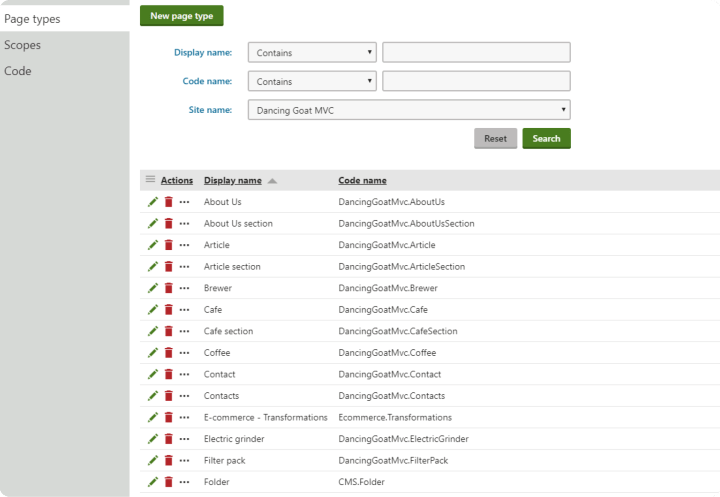
Create a list of all the page types you’re using.
Sorting your content
Note your taxonomy
Understand Kentico’s taxonomy system
Understand WordPress’s taxonomy system
Initiate content mapping
List all the existing content workflows
Mapping your URLs
Audit SEO performance
Audit user behavior
Performance audit
Traffic analysis and user behavior
Page speed testing
Mobile usability check
Load testing
Last updated on May 25, 2026
Laying the Foundation for Kentico to WordPress Migration
For any migration project to be a success, it’s important to understand why you considered migrating away from your current CMS(Kentico) in the first place. You also need to understand what considerations you need to make before to move to a certain CMS—WordPress, in this case.
That’s why your discovery stage starts by identifying the core reasons and needs for migrating from Kentico to WordPress, and documenting them for future evaluation.
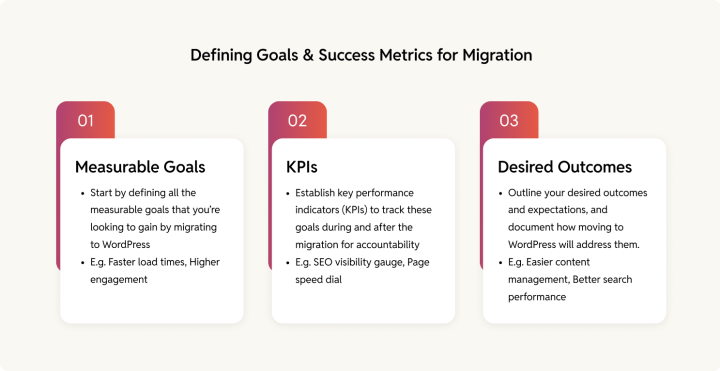
Start by defining all the measurable goals that you’re looking to gain by migrating to WordPress. These could be reduced maintenance costs, faster load times, improved website design, increased organic traffic, higher engagement, ease of use, and better scalability.
Next, establish key performance indicators (KPIs) to track these goals during and after the migration for accountability. For example, if you’re migrating for SEO concerns, evaluate your site’s current search visibility.
Also, outline your desired outcomes and expectations, and document how moving to WordPress will address them.
The discovery phase essentially helps you understand everything that needs to be moved to your new CMS. There are many parts to the discovery stage—let’s look at them one by one, starting with evaluating your current CMS setup.
Evaluate your existing Kentico setup
Kentico currently supports two versions of their Digital Experience Platform (DXP): Kentico Xperience 13 and Xperience by Kentico.
Identify the version you’re using and create a feature matrix that compares Kentico’s capabilities with those of WordPress. This matrix should document critical functionalities that must be retained in the migration, as well as features that can be dropped or replaced to optimize your WordPress setup.
Features****NeedsHeadless architecture Multilingual supportPersonalizationE-commerce capabilitiesContact forms,Lead magnet and Newsletter formContent SchedulingAnalyticsWorkflow customisationSEO featuresCookie consent managementUser roles Plugins and integrations
Continue adding elements to this list based on your Kentico setup.
This step helps you understand all the Kentico features you’re going to need to rebuild on WordPress. When we get to the actual migration step—specifically when we migrate your Kentico backend to WordPress—we’ll use this list to ensure feature/function parity.
Also, it’s important to plan how you want the new layout to appear on WordPress—whether you’d prefer to retain your current design or opt for a redesign. Your decision will adversely impact both the timelines and project scope. So it’s crucial to make this choice early in the process.
Review third-party integrations
If you’re using third-party integrations with your Kentico setup, document them to ensure smooth migration. For example, you might use Google Analytics for tracking web performance.
Access your Kentico dashboard and list all connected applications and their key capabilities. This will help you identify which features need to be replicated in WordPress, allowing you to install or develop the necessary custom plugins / API’s during migration.
Third-party integrations/ functionsKenticoWordPress****Analytics integration (Google Analytics)Google Site KitGoogle Site KitContent Delivery Network (CDN).Built-in support for CDN to improve load timesIntegrate CDN services (e.g., Cloudflare) to optimize content delivery globally.Salesforce marketing cloudOffers built-in two-way integration with Salesforce, allowing synchronization of various data types, including contacts and leads.Requires third-party plugins (e.g., WP Fusion, Zapier) for Salesforce integration, which can vary in functionality and ease of use.SEO managementBuilt-inMultiple plugin options like Yoast, Rank math, AIOSEO etcForms managementBuilt in (via Kentico’s Form Builder application)WPforms or Gravity formsMultilingual supportBuilt inAvailable via WPML (a WordPress multilingual plugin)
Comparing Kentico and WordPress user roles
Both CMS Kentico and WordPress have different roles for users, corresponding with different functionalities and limitations.
Kentico
- Editor: Has access to the administration interface, but the editor cannot give out permissions.
- Administrator: Has unrestricted access to non-global applications for all sites in the system.
- Global administrator: Has complete access to all parts of the website.
WordPress
- Subscribers: Can only view content and manage their own profile.
- Contributor: Can only edit and delete posts.
- Author: Can only control posts, not pages.
- Editor: Have full control over posts and pages, but they can’t access themes or plugins.
- Administrator: Has complete access to all features of the website.
Beyond these, there may be custom roles on each platform.
During migration it’s important to transfer all the roles along with the right permissions. User data is generally part of the content migration phases whereas custom coding roles and permissioning lies with the backend migration team.
Understanding the nomenclature differences between WordPress and Kentico
KenticoWordPressDescriptionPagesPostsUsed for posting blogs, articles, etc.Page typePagesTo create and organize main pages like “service”, “product” etc. ApplicationPluginTo bring additional features and functionalities for managing the site.Administration interfaceDashboardThe main control panel for managing WordPress and Kentico sites.Translation serviceMultilingual supportTo support regional languages by translating the content for your website. Useful for reaching wider audiences and streamlining content management.Page templatesThemesTo control and manage the site’s appearance and layout.MacrosShortcodesUsed for inserting predefined text or codes.Page builderGutenberg editor, Elementor etc This functionality simplifies content creation and layout management.
NavigationMenusOrganizes the site’s menus and handles navigation within the website.VersioningRevisionsTo track post and page changes.
Audit your content
A thorough content audit ensures that only relevant, optimized, and up-to-date content makes it to your new WordPress stack. Start by identifying the different types of pages on your Kentico website. Keep in mind that page types vary depending on your Kentico version:
For versions below 13:
- Standard page type
- Content-only page type
- Container page type
For version 13 and Xperience:
- Structured pages
- Pages with page builder
Create a list of all the page types you’re using.
When the migration process begins, you’ll have to map your different Kentico page types to corresponding structures in WordPress (through custom page templates, if needed).
Sorting your content
When you review your content in Kentico, you may come across old outdated, ghost pages, or duplicate content that doesn’t need to be migrated. Doing an audit of your content before migration can help a lot to speed up the Kentico to WordPress migration process and reduce clutter on the new site.
Note your taxonomy
Review your current taxonomy setup, as Kentico uses a classification or tagging system that differs from WordPress. Plan a direct mapping of your categories and tags to ensure a seamless transition and avoid confusion post-migration.
Kentico provides three types of categories:
- Personal categories
- Global categories
- Site-specific categories
Keep track of all the pages and their categories, and ensure to follow proper labeling techniques, to avoid data loss during migration.
For example, if your Kentico site has a “Product” custom post type with multiple subcategories like “Software” and “Hardware.” In WordPress, you can replicate this using a custom post type for “Product” and custom taxonomies to manage the “Software” and “Hardware” classifications.
Understand Kentico’s taxonomy system
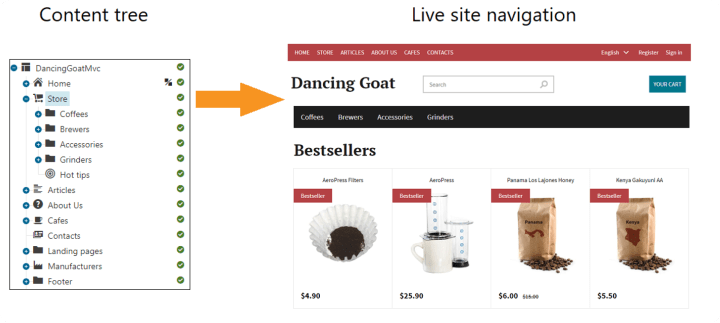
Kentico provides a combination of custom modules, hierarchical trees, and document types to organize content. As stated in Kentico’s documentation, taxonomies are to be used to break down content into groups based on their shared characteristics, allowing for structured organization through categories and subcategories.
The hierarchical taxonomy structure in Kentico allows for parent-child relationships among categories, which can be used to filter content and manage visibility based on user roles. Although, it can complicate transitions due to its complexity.
For example, as shown in the image below, “Store” contains coffees, brewers, and accessories, each with its categories or tags.
Understand WordPress’s taxonomy system
WordPress offers a simpler taxonomy system that revolves around categories and tags, with the option to create custom taxonomies for more complex needs. Recreating Kentico’s intricate hierarchical structure often involves:
- Setting up custom post types (e.g., “Products”, “Store”)
- Creating hierarchical custom taxonomies to replicate parent-child relationships
Plugins like Secure Custom Fields (SCF), Advanced Custom Fields (ACF), or Custom Post Type UI can help achieve these configurations, but careful planning is essential to ensure functionality and data integrity.
By understanding the differences between Kentico and WordPress taxonomies and planning accordingly, you can achieve a smooth transition while maintaining content structure and usability.
Initiate content mapping
The content visible on your existing website is deployed using Kentico’s site content tree-based routing method. These pages can contain various media files and structured content within them.
In Kentico, it’s crucial to understand how your content is mapped within the MVC application, as the routing logic is managed by the system. Begin by creating a detailed list of all the pages on your site, including multilingual pages if applicable, and track the associated URLs for each.
Develop a mapping sheet that aligns Kentico content types with their corresponding structures in WordPress. For instance, map Kentico pages to WordPress posts or custom post types. Ensure that all necessary fields (such as: title, body content, images and other media) are accounted for in the new structure.
List all the existing content workflows
Workflows are used in the editing of page content. Audit and document all workflows on your Kentico setup, as these will need to be recreated on WordPress.
For example, when an author drafts an article and submits it for review to an editor. The editor will review the content, make the necessary revisions, and then send it to the head of the relevant department for final approval. Once approved, the head publishes the article, which will be publicly accessible later on the website.
Additionally, note the roles and responsibilities of individuals involved in each workflow. This will help ensure proper access and capabilities are assigned to users in WordPress.
Kentico also offers basic and advanced editorial workflows. Access the workflows application in Kentico to review them and plan how they can be recreated on WordPress.
Mapping your URLs
List all the currently indexed pages and their URLs from your Kentico setup. Each page needs to retain its link on the WordPress site or use a suitable redirect. This way, it will help in preserving the content access for search engine crawlers.
Start by gathering all your link data, and create a link audit spreadsheet. Also, add URLs for multilingual versions of your pages if you have them.
Create a link audit spreadsheet to track all URLs from your Kentico setup, including multilingual versions if applicable. This step is essential to ensure that no content is lost during migration and that your SEO efforts are preserved.
Content assetKentico URLRedirect, if applicable****Multilingual URL (if applicable)****Home pagewebsite.com/about-us Yeswebsite.com/about-us/Blog posts (Number of assets)/content/blog/article-title Yes/fr/content/blog/article-title/Service pages/content/service/service-pages-abcYes/fr/content/service/service-pages-abc/
The above format will help you efficiently track and plan for redirects, ensuring that your SEO and user experience remain intact during the migration process.
Please note: This format is an example and can be customized based on your specific requirements and site structure.
Audit SEO performance
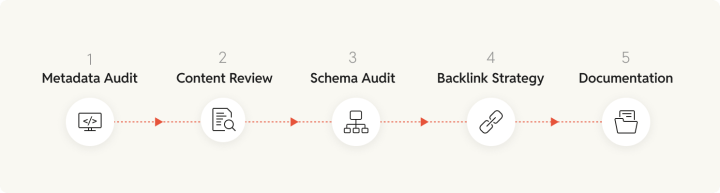
Migrating your SEO equity is a crucial part of transitioning from Kentico to WordPress. A comprehensive SEO audit will ensure that your rankings and search engine visibility are maintained throughout the migration process.
-
Review metadata
Start by auditing and documenting the SEO metadata on your pages. These would cover the meta titles, meta descriptions, alt tags, headings, OG Tags and others. -
Review your content, and analyze the performance for categories such as:
- High-performing content that drives traffic and engagement.
- Underperforming content with low traffic and engagement.
- Duplicate content that has similar information.
-
Schema markup audit
- Identify existing schema types: Use tools like Google Search Console to catalog the schema types currently implemented on your Kentico site.
- Check for errors: Validate your schema markup using a schema validator to detect any errors or warnings that could affect indexing.
- Analyze pages with and without schema: Ensure that there are no conflicting schema types after migration for the same content.
-
Backlinking strategy
Review your backlinks to ensure you’re not losing any valuable inbound links during the migration. Identify key backlinks pointing to your Kentico site and ensure the URLs are preserved or redirected correctly. Consider using tools like Ahrefs or SEMrush to help track these backlinks. -
Document SEO findings
Use Google Search Console (GSC) to gather data on current rankings, errors, and structured data.
This detailed documentation will ensure that your SEO equity is preserved during the migration, maintaining your site’s search engine visibility and performance.
Audit user behavior
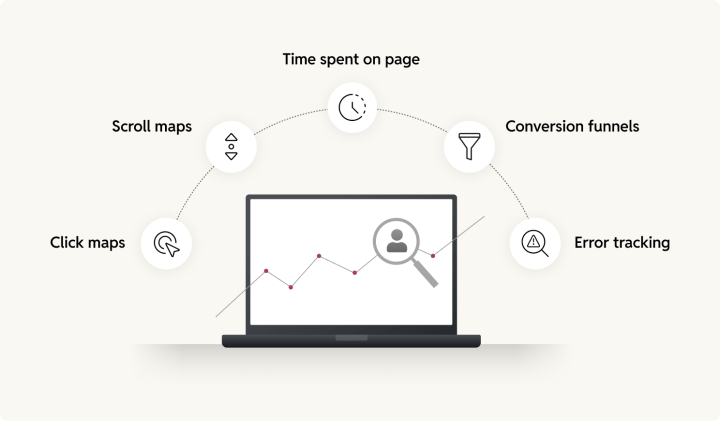
Before migrating to WordPress, it’s crucial to audit and understand your current website’s user behavior. By analyzing your current user interactions on your Kentico site, you can set a baseline for comparison and identify areas for improvement in the WordPress migration. Here’s how:
- Click maps: Where users click most, like buttons, links, and images.
- Scroll maps: How far users scroll, to determine the right placement of important content.
- Time spent on page: How long do your users currently stay on pages.
- Conversion funnels: User journeys and drop-offs.
- Error tracking: Technical issues that are currently affecting user experience.
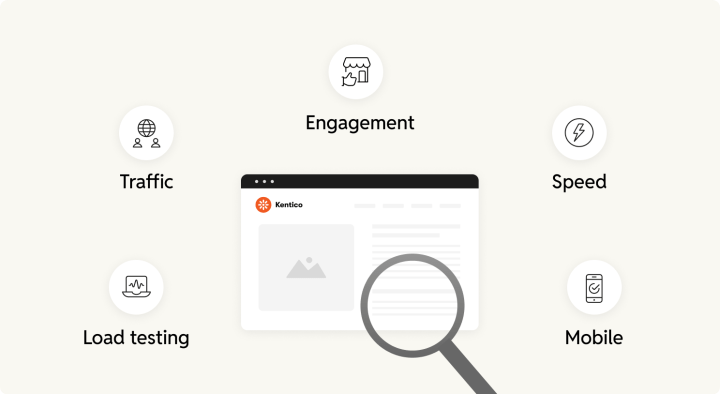
Performance audit
List and review all the metrics currently affecting your website growth and reach. These performance snapshots will set the benchmark for your upcoming WordPress stack, and also help you realize the impact of the migration project.
Traffic analysis and user behavior
Using tools like Google Analytics, to understand which pages and sections of the site are most valuable in terms of traffic and engagement. High-traffic pages should be prioritized during the migration to ensure their content is accurately transferred, while low-traffic pages can be evaluated for content refreshes or removal.
- Key metrics: Pay attention to metrics like heat maps, engagement rate, and average session duration to understand which pages are resonating with your audience.
- User flow: Evaluate how users are navigating the site, especially any unique interactions or user journeys that should be preserved on the new site.
Page speed testing
Once you have listed down all the pages and know the content tree organization. You will have to test these pages with tools of your choice. You could use Google’s free page speed analysis tool to measure your site’s current loading times which can be later used to compare with your new WordPress stack’s performance.
Mobile usability check
Check for mobile friendliness, if the website is configured for mobile devices.
Load testing
Carry out spike testing, to see how your current Kentico setup responds to traffic spikes. Which can occur during promotional events and seasonal traffic. This process will help you identify ways to optimize your new WordPress stack for better performance during high-traffic periods.
Kentico to WordPress migration guide
PREVIOUS
Credits

Vivek Tumulu
Author
Vivek Tumulu
Author
Vivek Tumulu is a Content Writer at rtCamp with over a decade of experience writing around enterprise technology and business strategy. His background spans across global IT operations, constru…

Good Work. Good People.
Industry partnerships


Compliance certifications


 United States India
© rtCamp Inc. since 2009. All rights reserved.
Terms of Service · Privacy Policy · Trust Center
Company
Solutions
Subscribe to our newsletter and get a few email updates every month.
United States India
© rtCamp Inc. since 2009. All rights reserved.
Terms of Service · Privacy Policy · Trust Center
Cookie Consent
We value your privacy
We use cookies to give you the best possible experience. By clicking “Accept,” you consent to our use of cookies to improve site functionality, analyze usage, and personalize content and communications. Your privacy matters to us, and we are committed to handling your data responsibly and transparently. Please check our Privacy Policy for more details.
Manage PreferencesDon’t AllowAllow All
Why do we use cookies?
×
By clicking "Accept" or "Decline All" at the bottom, you consent to the use of cookies and other tools as described in our Cookie Policy in accordance with your settings and accept our Terms of Service.
Toggle EssentialEssential
Essential cookies enable basic functions and are necessary for the proper function of the website.
Name
Description
Duration
Geolocation Config
This cookie is used to store the consent settings based on the visitor's location.
30 days
Cookie Preferences
This cookie is used to store the user's cookie consent preferences.
30 days
Toggle CloudFlareCloudFlare
CloudFlare provides web performance and security solutions, enhancing site speed and protecting against threats.
Service URL: developers.cloudflare.com (opens in a new window)
Name
Description
Duration
cf_clearance
Whether a CAPTCHA or Javascript challenge has been solved.
session
Toggle CommentsComments
These cookies are needed for adding comments on this website.
Name
Description
Duration
comment_author
Used to track the user across multiple sessions.
Session
comment_author_email
Used to track the user across multiple sessions.
Session
comment_author_url
Used to track the user across multiple sessions.
Session
Toggle GodamGodam
GoDAM" is primarily a specialized WordPress plugin and media management service designed to enhance video hosting, marketing, and asset management directly within the WordPress dashboard.
Service URL: godam.io (opens in a new window)
Name
Description
Duration
user_image
Temporarily stores the path to the user's avatar or profile picture for quick rendering in the website header.
session
user_id
Stores the numerical ID of the logged-in user to maintain session continuity and basic site operations.
session
full_name
Stores the logged-in user's display name to personalize the site interface without needing database queries.
session
system_user
First-party cookie used to store basic application state identifying the current system user role.
session
sid
A generic session ID cookie used to maintain user state and functionality as the visitor navigates through the site.
session
Toggle Google reCAPTCHAGoogle reCAPTCHA
Google reCAPTCHA helps protect websites from spam and abuse by verifying user interactions through challenges.
Name
Description
Duration
_GRECAPTCHA
Google reCAPTCHA sets a necessary cookie (_GRECAPTCHA) when executed for the purpose of providing its risk analysis.
179 days
Toggle Google Tag ManagerGoogle Tag Manager
Google Tag Manager simplifies the management of marketing tags on your website without code changes.
Name
Description
Duration
cookiePreferences
Registers cookie preferences of a user
2 years
td
Registers statistical data on users' behaviour on the website. Used for internal analytics by the website operator.
session
Toggle StatisticsStatistics
Statistics cookies collect information anonymously. This information helps us understand how visitors use our website.
Toggle Factors AIFactors AI
Factors.ai is a B2B account intelligence and marketing analytics platform that helps Go-To-Market (GTM) teams identify anonymous website visitors, track buyer journeys, and measure the ROI of marketing campaigns.
Service URL: www.factors.ai (opens in a new window)
Name
Description
Duration
_fuid
It is sent to capture session details and track user behavior across your website to provide behavioral data and intent signals.
1 Year
Toggle Google AnalyticsGoogle Analytics
Google Analytics is a powerful tool that tracks and analyzes website traffic for informed marketing decisions.
Service URL: policies.google.com (opens in a new window)
Name
Description
Duration
FPGSID
Stores a session or user identifier to track how visitors interact with a website. This helps Google Analytics measure website performance, user engagement, and usage patterns.
Session
FPLC
Used by Google Analytics to link visitor interactions and sessions across multiple related domains.
20 hours
FPID
A server-side Google Analytics cookie used as an alternative user identifier when third-party cookies are restricted.
2 years
_ga
ID used to identify users
2 years
_ga_
ID used to identify users
2 years
Toggle Jetpack StatsJetpack Stats
Jetpack's built-in visitor analytics. It records page views, referring sites, search terms, and outbound link clicks, and also carries the shared visitor-tracking library used by Jetpack Instant Search and WooCommerce Analytics.
Service URL: automattic.com (opens in a new window)
Name
Description
Duration
tk_aip
Stores a list of anonymous visitor IDs so they can be merged into one identity once a visitor is recognized.
Up to 5 years
tk_tc
Used once per page load to work out which cookie domain the Tracks library should use, then removed as soon as it's read back.
Session (deleted immediately after use)
tk_qs
Queues analytics events for Jetpack's Tracks library so none are lost if the page closes before they can be sent.
30 minutes
tk_ai
Stores a randomly-generated anonymous visitor ID so Jetpack's Tracks analytics library can link tracking events to the same visitor.
Session in wp-admin; up to 5 years on the frontend
Toggle Microsoft ClarityMicrosoft Clarity
Clarity is a web analytics service that tracks and reports website traffic.
Service URL: clarity.microsoft.com (opens in a new window)
Name
Description
Duration
CLID
Identifies the first-time Clarity saw this user on any site using Clarity.
12 months
ANONCHK
Indicates whether MUID is transferred to ANID, a cookie used for advertising. Clarity doesn't use ANID and so this is always set to 0.
Session
_clck
Persists the Clarity User ID and preferences, unique to that site is attributed to the same user ID.
12 months
_clsk
Connects multiple page views by a user into a single Clarity session recording.
12 months
Toggle Parse.lyParse.ly
Parse.ly is a content analytics platform that helps publishers optimize audience engagement and content performance.
Name
Description
Duration
cookies.js_dtest
This cookie determines whether the browser accepts cookies.
session
_parsely_session
JSON document storing information identifying a browsing session according to Parsely’s proprietary definition
30 minutes
_parsely_visitor
JSON document uniquely identifying a browser and counting its sessions
13 months
Toggle SalespanelSalespanel
Salespanel is a B2B marketing and sales software that identifies, tracks, and qualifies website visitors and leads in real-time using first-party data. It helps businesses monitor customer journeys, score leads based on behavior, and syncs this data with CRMs (like Pipedrive or HubSpot) to improve conversion rates.
Service URL: salespanel.io (opens in a new window)
Name
Description
Duration
track_uid
Identify and tracking a lead
12 moths
Toggle MarketingMarketing
Marketing cookies are used to follow visitors to websites. The intention is to show ads that are relevant and engaging to the individual user.
Toggle Bing / MicrosoftBing / Microsoft
Bing, powered by Microsoft, is a search engine providing web, image, video, and map search capabilities.
Name
Description
Duration
MR
Used to collect information for analytics purposes.
6 months
ANONCHK
Used to store session ID for a users session to ensure that clicks from adverts on the Bing search engine are verified for reporting purposes and for personalisation
10 minutes
SM
Used by Microsoft in synchronizing the MUID across multiple Microsoft domains to track users for advertising.
session
MUID
Identifies unique web browsers visiting Microsoft sites. These cookies are used for advertising, site analytics, and other operational purposes.
1 year
Toggle DoubleClick/Google MarketingDoubleClick/Google Marketing
A comprehensive digital advertising platform for managing campaigns, optimizing performance, and analyzing audience data.
Name
Description
Duration
IDE
This cookie is used for targeting, analyzing and optimisation of ad campaigns in DoubleClick/Google Marketing Suite
2 years
ar_debug
Store and track conversions
Persistent
Toggle LinkedInLinkedIn
LinkedIn is a professional networking platform for job seekers, employers, and industry connections.
Name
Description
Duration
bscookie
Used by LinkedIn to track the use of embedded services.
1 year
AnalyticsSyncHistory
Used to store information about the time a sync with the lms_analytics cookie took place for users in the Designated Countries
30 days
bcookie
Used by LinkedIn to track the use of embedded services.
1 year
li_sugr
Used to make a probabilistic match of a user's identity outside the Designated Countries
90 days
lidc
Used by the social networking service, LinkedIn, for tracking the use of embedded services.
1 day
UserMatchHistory
Used by LinkedIn Ads to synchronize and match user IDs across different ad networks and data providers.
30 days
Toggle LinkedIn InsightLinkedIn Insight
LinkedIn Insight is a web analytics service that tracks and reports website traffic.
Service URL: www.linkedin.com (opens in a new window)
Name
Description
Duration
li_sugr
Used to make a probabilistic match of a user's identity.
90 days
lidc
Used for routing and session management.
24 hours
Toggle LiveIntentLiveIntent
LiveIntent provides a platform for email advertising and identity-driven marketing solutions.
Name
Description
Duration
_lc2_fpi_js
Companion cookie to _lc2_fpi used by JavaScript to facilitate cross-domain ad tracking and user identification.
1 year
_lc2_fpi
First-party tracking cookie usually associated with LiveRamp to identify users across devices for targeted advertising.
1 Year
_li_ss
Sets a unique ID for the visitor, that allows third party advertisers to target the visitor with relevant advertisement. This pairing service is provided by third party advertisement hubs, which facilitates real-time bidding for advertisers.
1 month
lidid
Collects data on visitors' behaviour and interaction - This is used to make advertisement on the website more relevant. The cookie also allows the website to detect any referrals from other websites.
2 years
Toggle Cookie PolicyCookie Policy
You can find more information in our Privacy Policy.
Allow AllDecline All
Accept